(302) 262 8484
New Mac Malware Steals Everything While You Sleep

You plug in your MacBook, close the lid, and go to sleep. While the machine appears idle, a background process systematically drains your crypto wallets, copies your browser history, and harvests your most sensitive passwords. This is not a hypothetical security drill. A new Mac malware strain known as MacSync operates exactly this way, designed specifically to function in the shadows without making a sound.
What is the MacSync Malware?
Cybersecurity researchers recently identified MacSync as a rapidly evolving family of info-stealers, representing a significant shift in macOS threat complexity. Older Mac malware often relied on simple scripts that built-in security tools could easily flag, but modern threats require robust small business cybersecurity protection. MacSync’s developers, however, wrote this variant in native Swift and Objective-C. This makes the code fast, efficient, and much harder to detect.
MacSync does not just grab a few files and disappear. It installs a dual-threat payload consisting of an aggressive info-stealer and a persistent backdoor. Once inside, it quietly establishes a permanent foothold on your machine.
How This New Mac Malware Disguises Itself
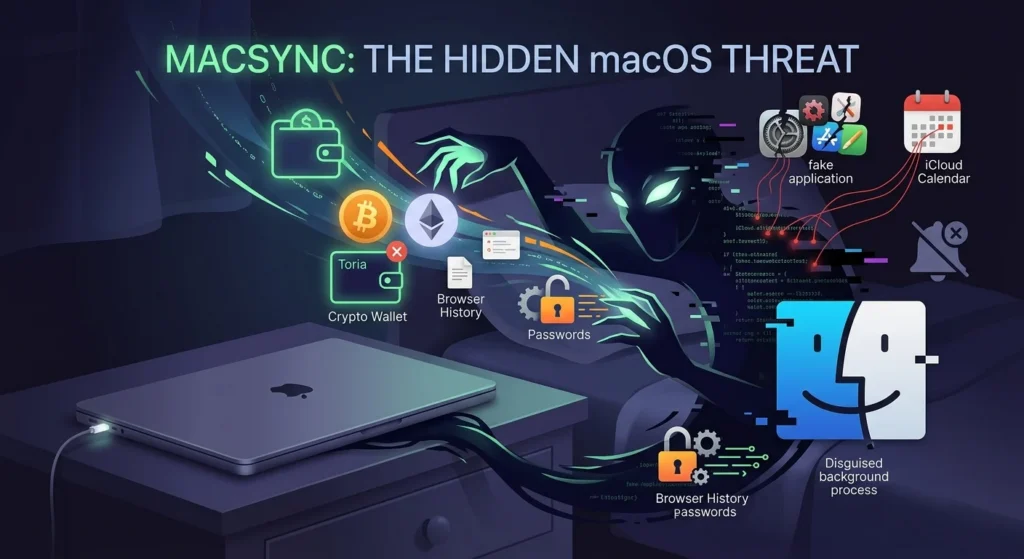
To operate invisibly, the backdoor module disguises itself as Finder, the default file manager on macOS.
Because it looks like a standard system process, it blends in perfectly. The installation script also actively terminates macOS notification processes to suppress system alerts. This ensures no warning pop-ups appear to tip you off while your data is exfiltrated.
The infection chain spreads through several deceptive methods:
- Fake Applications: Disguised as cracked software, productivity tools, or nonexistent crypto wallets like “Toria”.
- iCloud Calendar Abuse: The attackers have weaponized public iCloud calendar events to secretly host and deliver malicious payloads.
- Deceptive Prompts: Once installed, the malware mimics a legitimate app and prompts you for your administrator password. After you enter it, the program displays an error message claiming the app is “damaged” and should be moved to the bin. You might think nothing of it, but the trap is already sprung.
What Does MacSync Steal?
This new Mac malware targets nearly everything on the machine. Because it installs a backdoor with deep system access, the attackers can periodically pull new data from your Mac whenever they want.
The Dangerous Scope of Stolen Data
Once on your system, the malware targets a broad range of personal and professional data:
- Saved browser credentials, cookies, and search history
- Cryptocurrency wallet extensions and local wallet app data
- The macOS Keychain file, which holds your saved system passwords
- SSH keys, AWS credentials, and Git configurations
- Telegram session data and personal documents
If you leave your Mac on and connected to the internet overnight, the backdoor can receive commands from an attacker-controlled server, package your data, and upload it before morning.
How to Protect Your Mac from MacSync
The assumption that Macs are naturally immune to malware is outdated. Attackers are increasingly exploiting human trust rather than technical software bugs, which means your habits are your best defense.
Never copy and paste commands into your Terminal just because a website tells you to—a popular social engineering tactic known as ClickFix. Be highly suspicious of any app that claims to be “damaged” right after you enter your system password. Finally, consider turning off your Mac or disconnecting it from the internet overnight to guarantee that no background processes can communicate with external servers while you sleep.
For more tips on securing your Apple devices, see our guide on [macOS security best practices].