(302) 262 8484
Thick Walls? Do THIS Instead Of Buying Extenders

You have probably experienced this: you walk into your kitchen or bedroom, and your Wi-Fi signal drops to a single bar. If your home has thick walls, buying a standard Wi-Fi extender won't fix a spotty connection. Standard plug-in extenders are usually the wrong approach for this specific problem.
Why You Should Handle Thick Walls Differently (Instead of Buying Extenders)
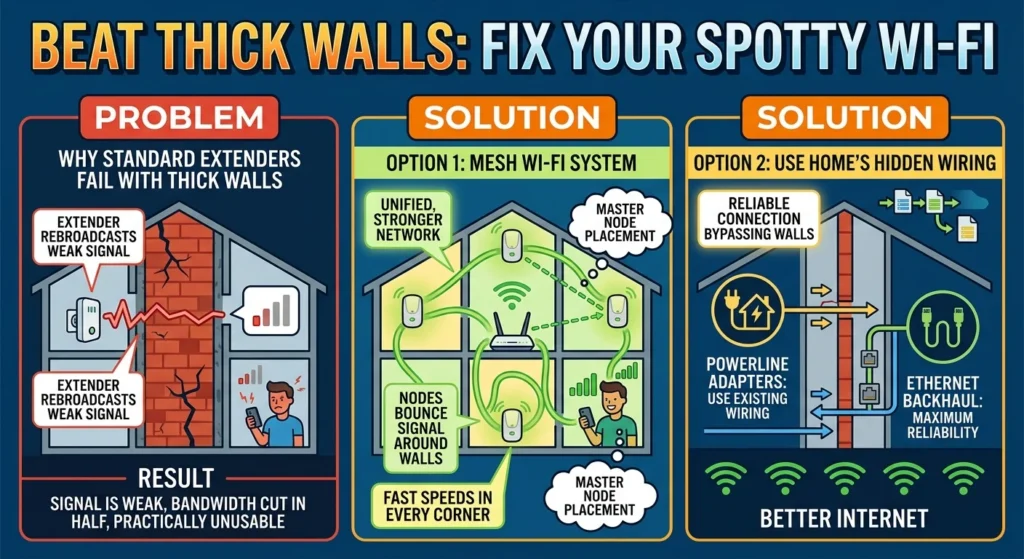
Wi-Fi extenders seem logical. They take your existing wireless signal and rebroadcast it further into the house. But when you are dealing with thick concrete, brick, or plaster walls, this approach fails. An extender can only repeat the signal it receives.
If the connection reaching the extender is already weakened by a dense wall, the device simply rebroadcasts that degraded signal. Furthermore, traditional repeaters usually cut your bandwidth in half because they use the same wireless channel to communicate with the router and your device simultaneously. You get a network that shows a connection but is practically unusable, often because of a simple Wi-Fi mistake that’s slowing down your entire house.
Option 1: Switch to a Mesh Wi-Fi System
A mesh Wi-Fi system is a significant upgrade over a standard router-and-extender configuration. Instead of a single router trying to push a signal through every wall, a mesh setup uses a main router alongside multiple satellite nodes placed around the house. These nodes work together to form a single, unified network. For more details on setting up a whole-home system, see our guide on [choosing the best mesh Wi-Fi].
Mastering Node Placement
The key to making mesh Wi-Fi work in a house with thick walls is placement. You cannot just put a node in a dead zone and expect a good connection. Instead, position the nodes where they have a clear line of sight to each other, like down hallways or near open doorways. By bouncing the signal around the thick walls rather than forcing it directly through them, you can maintain high speeds across your home.
Option 2: Use Your Home’s Hidden Wiring
If you need a reliable connection but cannot run Ethernet cables through historic plaster walls, you have other options. Your home likely has physical wiring inside the walls that you can use to bypass wireless interference entirely.
Powerline Adapters: The Instant Ethernet Port
Powerline adapters are highly effective for home networking. Sold in pairs, these devices are simple to set up: you plug one into an electrical outlet near your router and connect it with an Ethernet cable, then plug the second adapter into an outlet in your dead zone. The internet signal travels through your home’s existing copper electrical wiring, bypassing brick and concrete walls. This gives you a stable, physical connection in another room without drilling holes.
MoCA Adapters: The Coaxial Secret Weapon
If your home has old cable TV outlets in multiple rooms, MoCA (Multimedia over Coaxial) adapters are an even better option than Powerline. MoCA technology converts your home's coaxial cabling into a high-speed Ethernet network. It is very fast, offers ultra-low latency, and ignores the interference that disrupts wireless signals. It is the closest alternative to a professionally wired network without the high installation costs.
Option 3: Adjust Your Router Settings for Free
Before buying new hardware, you can change a few settings on your current router to help the signal penetrate heavy obstacles.
Force the 2.4 GHz Band
Modern routers broadcast on multiple frequencies, typically 2.4 GHz, 5 GHz, and sometimes 6 GHz. The 5 GHz and 6 GHz bands provide fast speeds but have short wavelengths, causing them to drop off heavily when hitting solid brick or concrete. The older 2.4 GHz band is slower, but its longer wavelengths pass through dense materials much more effectively. If a device in a distant room keeps dropping its connection, try forcing it onto the router’s 2.4 GHz band.
Enable Beamforming
Log into your router’s admin panel and see if Beamforming is enabled. Standard routers broadcast their signal in all directions, similar to a lightbulb. Beamforming works differently. It detects the location of your devices and focuses the wireless signal directly toward them, more like a flashlight. This targeted signal has a better chance of penetrating thick walls to reach your devices.
How to Choose the Right Strategy for Your Home
Here is a quick breakdown to help you decide which approach makes sense for your setup:
- Choose Mesh Wi-Fi if you have a larger budget and want seamless, whole-home wireless coverage for roaming devices like phones and tablets.
- Choose Powerline Adapters if you need a quick, budget-friendly wired connection for a single device like a gaming console or smart TV.
- Choose MoCA Adapters if you have existing coaxial cable outlets and want the fastest, most stable speeds possible.
- Choose Router Tweaks if you want to try improving your signal immediately without spending money.
Stop Fighting the Walls
Thick walls do not mean you have to settle for a poor internet connection. Rather than buying standard extenders that often fail to solve the problem, look for solutions that accommodate your home's layout. Whether you bounce your signals with a mesh system, route them through your electrical outlets, or adjust your router settings, you can establish a fast, reliable network.