(302) 262 8484
Getting Locked Out of Your Account Happens Faster Than You Think

You know your password. You type it in perfectly. Then the screen asks to send a verification code to a phone number you have not owned since 2019.
Just like that, you are locked out of your account. There is no customer service hotline to call. There is no magic reset button. Your photos, emails, and purchases are suddenly sitting behind an invisible wall.
Getting locked out of your account is one of the most frustrating digital experiences possible. People usually blame hackers, glitchy software, or a lack of robust small business cybersecurity protection. But the truth is much less dramatic.
Most of the time we do this to ourselves.
The Simple Mistake: Ignoring Your Account Recovery Settings
The single biggest reason people get locked out of their accounts is failing to update their recovery information before a major life change.
We set up an account, link a phone number or email address, and completely forget about it. Years pass. We change jobs. We switch cell phone carriers. We graduate from college.
Then a platform flags a login as suspicious and demands secondary verification. If that verification goes to a dead inbox or an old phone, you are in serious trouble.
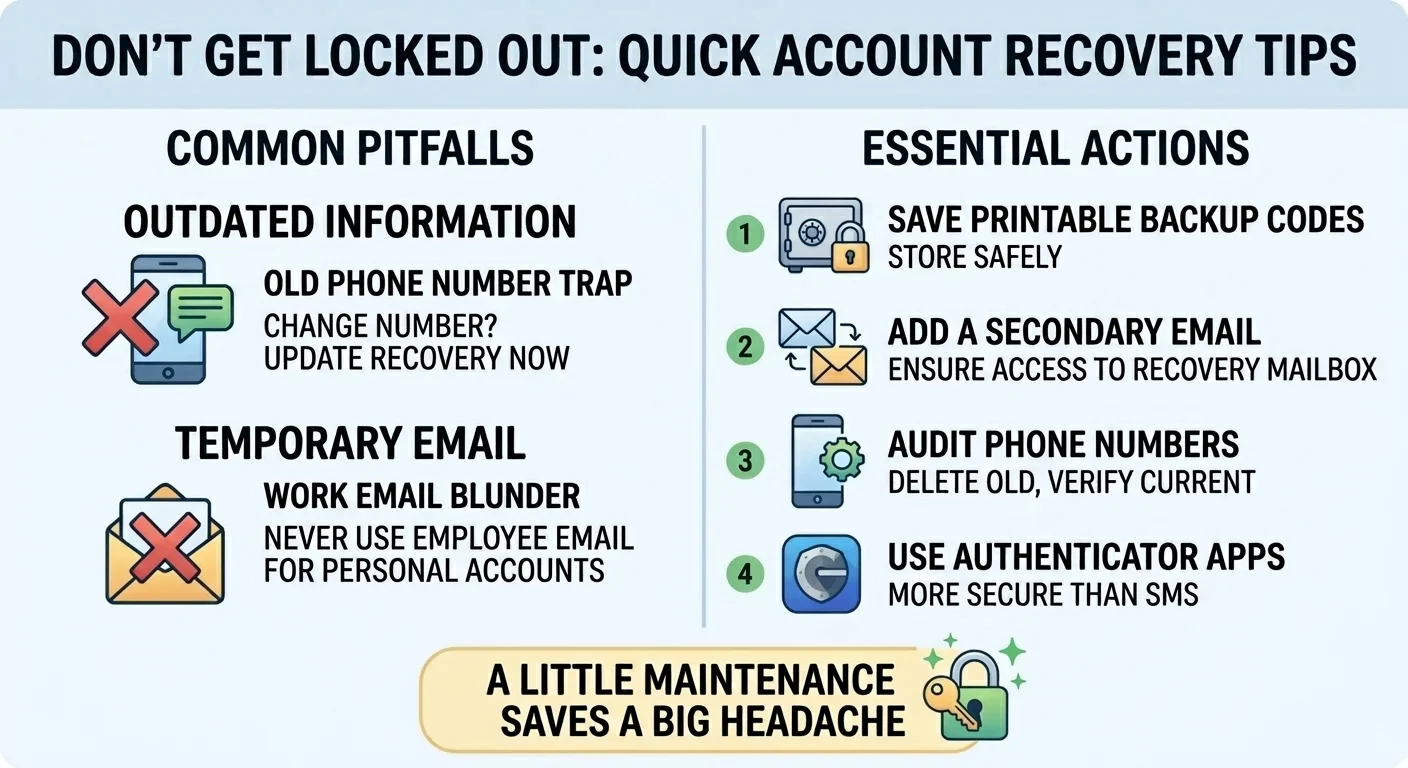
The “Old Phone Number” Trap
This is where it matters most. Two-factor authentication is fantastic for security. You absolutely should use it as part of a broader strategy for small business IT consultation. See our guide on [setting up two-factor authentication] for the best ways to secure your data.
But tying your security to SMS text messages is a massive risk. People trade in their phones every day. They switch carriers and sometimes lose their numbers in the process. If your bank or email provider only knows that old number, proving your identity becomes a nightmare.
The Work Email Blunder
Here is another incredibly common scenario. You use your company email address to sign up for a personal service. Maybe it is a frequent flyer account or a software subscription.
Then you leave the company. Your IT department deletes your email address the next day.
A year later you forget your password for that personal service. You click the reset button. The reset link goes to an email inbox that no longer exists. You just lost your account because you tied personal access to temporary corporate real estate.
How to Stop Getting Locked Out of Your Accounts
You do not need to be a cybersecurity expert to fix this. You just need to take ten minutes right now to audit your most important logins and ensure you have proactive IT monitoring for small business needs.
Think about your primary email, your bank, and your main social media profiles. These are the hubs of your digital life. If you lose access to your primary email, you lose the ability to reset passwords for everything else.
Take these steps to bulletproof your access:
- Generate and save backup codes. Almost every major platform offers printable backup codes when you set up two-factor authentication. Print them out and put them in a physical safe.
- Add a secondary recovery email. Make sure your primary email account has a backup email linked to it. This backup should be an account you check regularly.
- Audit your phone numbers. Go into your security settings and delete any old phone numbers. Only your current active device should be listed.
- Use a trusted authenticator app. Move away from SMS text verification. Apps like Authy or Google Authenticator are much more secure and can often be backed up to the cloud.
What to Do If You Are Already Locked Out
So what does that mean for you if the worst has already happened?
Do not panic. First, check if you are still logged in on another device. An old tablet or a work laptop might still have an active session. If you are logged in somewhere else, you can usually update your security settings from there.
If that fails, look for an account recovery form. Major tech companies have automated systems to help you regain access. You will likely need to answer security questions or provide details about when you created the account.
The most secure lock in the world is useless if you throw away the only key. Account recovery is just as important as password strength.
Stop relying on memory and luck. Take a few minutes today to check your recovery settings. Update your phone number. Print those backup codes. A little bit of boring maintenance right now will save you from a massive headache tomorrow.