(302) 262 8484
IT Pros Know This Metal Object Kills Router Signals

If your internet speeds drop to a crawl when you walk into the next room, you might blame your internet service provider. But the reality is usually closer to home. Metal objects kill router signals, acting as an invisible barrier for your wireless connection. Everyday household items you might not suspect are often the cause of these drops.
Why a Simple Metal Object Kills Router Signals Instantly
To understand why metal kills router signals, you have to look at the physics of Wi-Fi. Your router broadcasts data using high-frequency radio waves, typically at 2.4 GHz or 5 GHz. These waves travel easily through the air and pass through drywall and wood with minimal loss, but they struggle when they hit solid, conductive materials. Metal acts like a mirror for these frequencies.
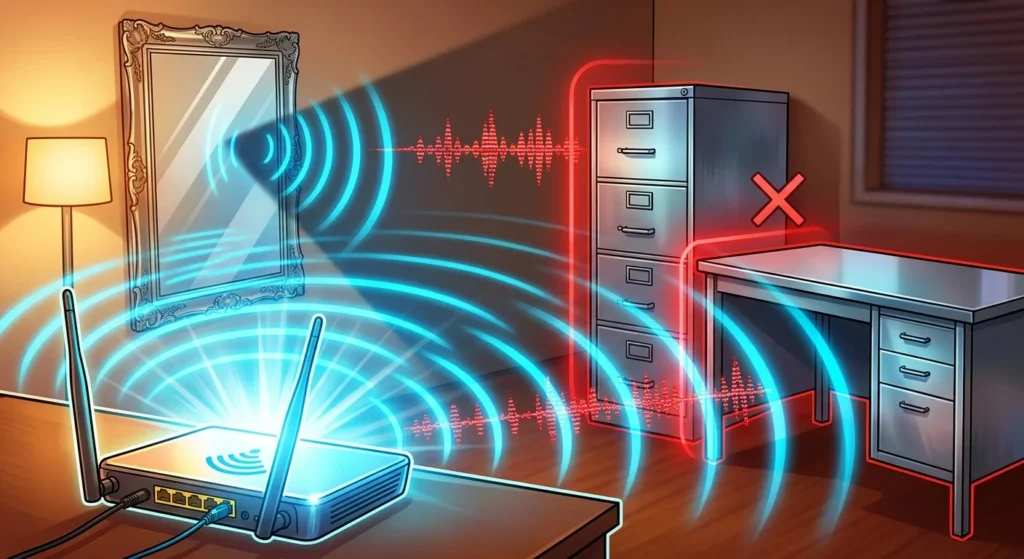
Instead of letting the signal pass, metal absorbs or reflects electromagnetic waves. This creates instant dead zones and dropped packets. If you place your router directly next to a large metal surface, you are essentially trapping the signal inside a partial cage.
The Common Culprits: Which Metal Object Kills Router Signals in Your Home?
You might not think you have massive blocks of metal in your living room. However, some of the most common offenders are disguised as everyday decor or furniture.
How a Hidden Metal Object Kills Router Signals: Mirrors
Mirrors catch a lot of people off guard because they are not just glass. To create a reflective surface, manufacturers coat the back of the glass with a thin layer of metal, usually aluminum or silver. Because of this backing, a large decorative mirror behaves exactly like a solid metal sheet. It bounces your Wi-Fi signals in the wrong direction and creates massive dead zones directly behind the wall where it hangs.
The Classic Blockers: Metal Desks and Filing Cabinets
If you are trying to improve your work-from-home setup, placing your router directly on a heavy metal desk or tucked next to a steel filing cabinet is a mistake. The metal frame blocks signals traveling downward or upward, leaving your basement or second floor disconnected. If you are also struggling with peripheral lag, see our guide on how to fix a mouse cursor that keeps freezing or jumping around.
The Structural Shield: Foil-Backed Insulation and Metal Mesh
The walls themselves might be the issue. Older houses often use plaster walls supported by a metal mesh lath, while modern homes frequently use foil-backed insulation. Both materials create a physical shield around your rooms, making it incredibly difficult for radio waves to penetrate from one space to the next.
How to Spot the Signs of Metal Interference
To figure out if a metal object is killing router signals in your specific layout, look for these signs:
- Your connection drops completely when you close a specific door.
- Wi-Fi speeds are lightning-fast in the living room but non-existent in the bedroom next door.
- Your devices constantly disconnect and reconnect as you walk around the house.
- You experience high latency or lag while gaming, even though you are close to the router.
Simple Fixes to Reclaim Your Wi-Fi Speed
You do not need to replace your furniture or tear down your walls to fix this issue. A few strategic adjustments usually resolve the problem.
Elevate and Centralize Your Router
Stop hiding your router in a corner or inside an entertainment center. Place it in a central, elevated location. Getting it off the floor and away from large appliances or metal desks allows the radio waves to propagate outward and downward without hitting immediate roadblocks.
Upgrade to a Modern Mesh System
If your home’s structure is full of metal lath or foil insulation, a single router will not be enough. You should consider upgrading to a mesh Wi-Fi system. These systems use multiple nodes placed throughout your home to route the signal around physical obstacles, ensuring you get a strong, stable connection in every corner.