(302) 262 8484
The Hidden Costs of Bad Tech Habits

Running a company takes an incredible amount of work. You are managing employees, tracking finances, and trying to keep your customers happy. It is incredibly easy to let technology fall to the bottom of your priority list. But ignoring your tech infrastructure is a massive risk. In fact, the IT mistakes small businesses make often lead to extended downtime, lost data, and massive financial hits.
Many business owners assume they are simply too small to be a target for hackers. They might also think their current network setup is good enough for now. That exact mindset is what gets companies into deep trouble. A single server crash or a clever phishing scam can cost thousands of dollars to fix. Let us break down the most expensive errors and look at how you can easily avoid them.
The Real Cost of the Most Common IT Mistakes Small Businesses Make
Technology should make your life easier. When it is ignored or mismanaged, it becomes a liability. Here are the top missteps that drain budgets and kill productivity.
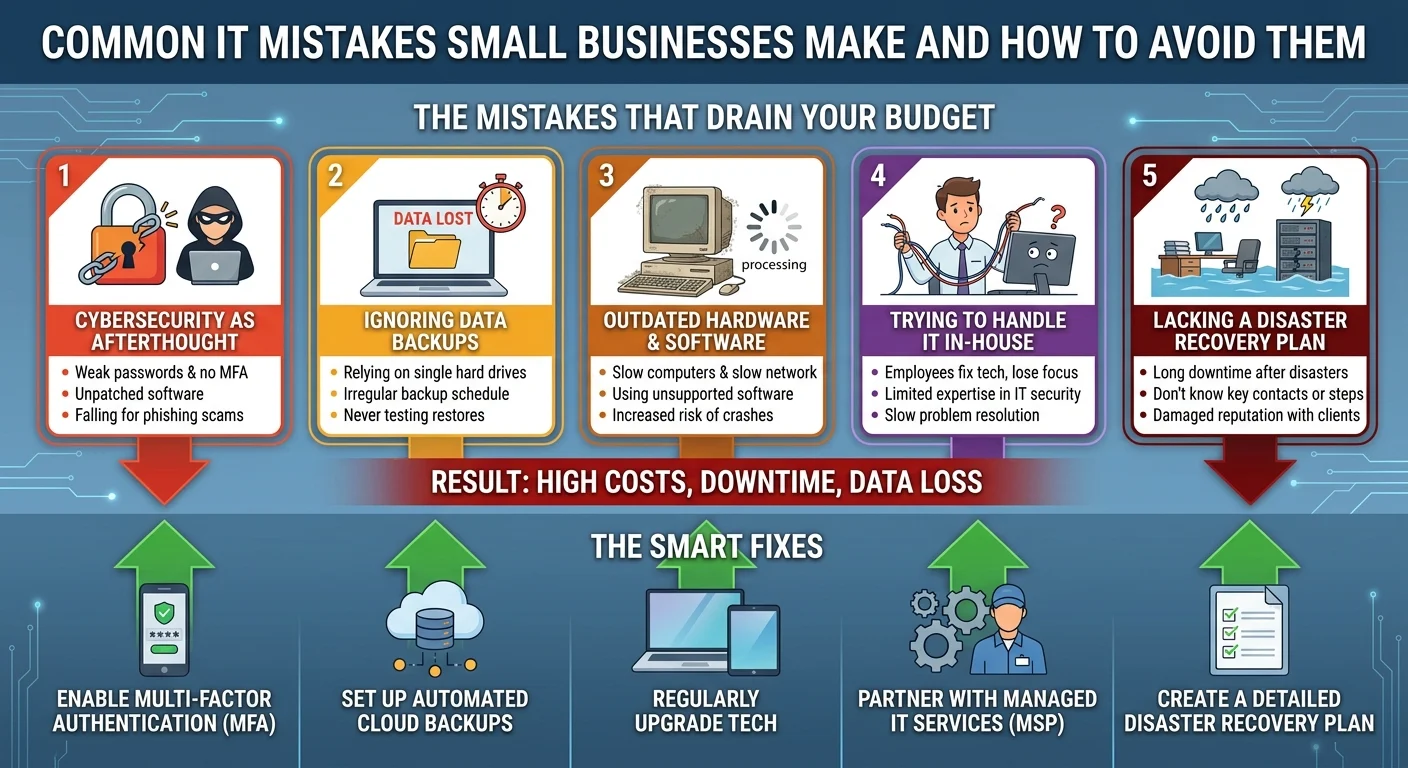
Mistake 1: Treating Cybersecurity as an Afterthought
A lot of small business owners think cybercriminals only go after massive corporate enterprises. The truth is quite the opposite. Hackers absolutely love targeting smaller operations because they usually have much weaker defenses in place.
Skipping basic security measures leaves your front door wide open. A simple ransomware attack can lock you out of your own customer files until you pay a hefty fee to the attackers. Investing in proper Small Business Cybersecurity Protection is always cheaper than paying a ransom or dealing with a lawsuit.
Mistake 2: Ignoring Regular Data Backups
Imagine logging into your computer tomorrow morning and finding that all your financial records are gone. Hardware fails all the time. Laptops get stolen from cars. Employees accidentally delete crucial project folders. If you do not have a reliable data backup solution running in the background, you are gambling with your livelihood.
Storing files on a single external hard drive in the office does not count as a true backup strategy. You need automated cloud backups that update daily, which is a core component of our IT Infrastructure for Small Businesses. This ensures you can restore your entire system quickly if a disaster strikes.
Mistake 3: Relying on Outdated Hardware and Software
Squeezing just one more year out of a five-year-old laptop might feel like a smart way to save a few bucks. In reality, aging technology drains your budget through lost productivity. Slow computers frustrate your team and waste valuable working hours every single week.
Older software also poses a massive security threat. When developers stop releasing security patches for old programs, hackers quickly figure out how to exploit them. Upgrading your tech stack regularly through professional PC Upgrades in Delaware keeps your team efficient and your sensitive data safe.
Mistake 4: Trying to Handle IT Support In-House
We see this specific scenario all the time. The office manager or the most tech-savvy sales rep gets tasked with fixing printer jams and setting up new email accounts. This DIY approach to small business IT support sounds budget-friendly but actually ends up costing you money.
Your employees should be focused entirely on the jobs you hired them to do. When they spend hours troubleshooting a random network issue, your business loses momentum. Partnering with a managed IT services provider gives you access to expert help without the heavy cost of a full-time IT hire.
Mistake 5: Lacking a Clear Disaster Recovery Plan
What happens if a pipe bursts in your office over the weekend and ruins your servers? Most small businesses do not have a solid answer to that question. A disaster recovery plan is your step-by-step playbook for getting operations back up and running after a major catastrophe.
Without a plan, you will waste precious time trying to figure out who to call and what systems to restore first. Every hour of downtime costs you money and damages your reputation with your clients.
How to Fix These Costly Technology Blunders
Fixing these issues does not mean you have to spend a fortune overnight. Start by assessing your current setup and identifying your biggest vulnerabilities. Often, a few simple changes can drastically reduce your daily risk.
Here is a quick checklist to get you started on the right path:
- Enable multi-factor authentication on all company email and financial accounts.
- Set up automated cloud backups that store your data safely off-site.
- Audit your hardware and plan to replace any computers older than four years.
- Train your staff on how to easily spot and report phishing emails.
If you feel overwhelmed by the technical side of things, see our related guide on [How to Choose the Right Managed IT Provider] to learn more about outsourcing your tech needs safely.
Key Takeaways for Protecting Your Business
Technology should be a tool that helps your business grow. By recognizing and avoiding these common errors, you protect your bottom line and give yourself total peace of mind.
Do not wait for a major server crash or a scary security breach to finally take action. Be proactive with your technology strategy today so you can focus on serving your customers tomorrow.