(302) 262 8484
This Invisible Malware Survives Even After Factory Resets

For years, the standard troubleshooting advice for a severely infected device was simple: wipe it clean. But that reliable safety net sometimes fails. Today, sophisticated malware can survive a factory reset, hiding deep within a system to reinfect the device the moment it reboots.
You might back up your photos, run the reset, wait for the progress bar to finish, and assume your computer is secure again. Unfortunately, attackers rely on that exact assumption.
Can Malware Survive a Factory Reset?
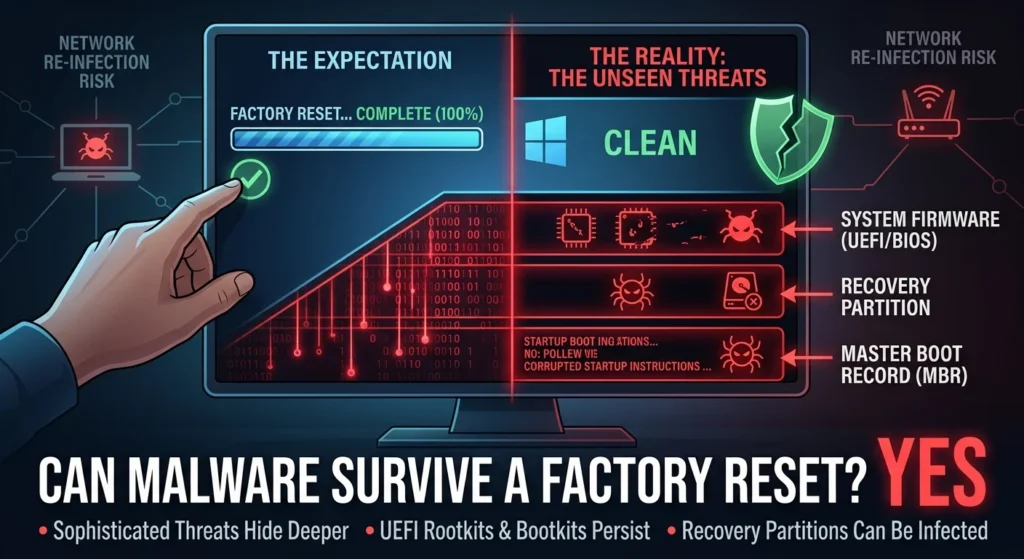
Yes, certain advanced types of malware survive a factory reset. Standard viruses and trojans are wiped out during the process, but highly sophisticated threats like UEFI rootkits, bootkits, and malware that infects the system recovery partition persist because they operate outside standard operating system files, often requiring professional malware, ransomware, and virus removal services in Delaware to fully eradicate.
How Malware Survives Factory Reset Procedures
To understand how malware survives a factory reset, you have to look at where your data is stored. A standard reset only clears the user data on your main storage drive. It does not touch the foundational layers of your hardware’s code.
If a factory reset does not clean a device, where exactly are these threats hiding? Security researchers have mapped out several key areas where persistent malware takes refuge:
- System Firmware (UEFI/BIOS): Code embedded directly on motherboard chips that runs prior to OS initialization.
- The Recovery Partition: The hidden slice of your hard drive used to reinstall the operating system, which can itself become infected.
- The Master Boot Record (MBR): The critical startup sector of your drive that tells the computer how to load the operating system.
- Infected Network Neighbors: Devices like routers, smart cameras, or printers that remain infected and immediately reinfect your clean device once it reconnects to the local network.
The UEFI and BIOS Threat: CosmicStrand and BlackLotus
The most dangerous form of persistent threat is the UEFI bootkit. The Unified Extensible Firmware Interface (UEFI) is the software that runs the second you press the power button, long before your operating system begins to load. It is stored on a flash memory chip soldered directly to your motherboard, completely separate from your hard drive or SSD.
Consider CosmicStrand, a highly sophisticated UEFI rootkit discovered by security researchers. Because CosmicStrand lives inside the motherboard’s firmware, it is immune to anything you do to your hard drive. You can format the drive, reinstall Windows from scratch, or even replace the SSD entirely, yet the malware remains untouched, waiting to hijack the boot process.
Then there is BlackLotus, the first in-the-wild malware capable of bypassing UEFI Secure Boot on fully patched Windows systems. These rootkits hook deep into the Windows kernel, rendering traditional antivirus software and standard operating system resets useless, which is why proactive IT monitoring for small business is essential for early detection.
Android and Mobile Threats: How Malware Survives Factory Resets on Phones
This persistence is not limited to desktop PCs. In the mobile environment, the xHelper Android malware infected tens of thousands of smartphones by using advanced rooting exploits to gain administrative access. Once inside, it wrote itself directly into the device’s system partition.
When users performed a factory reset, the OS reinstalled itself using that compromised system partition, effectively reinstalling the malware. Users would watch the same malicious pop-ups and rogue applications reappear just hours after a complete wipe.
How to Defeat Malware That Survives a Factory Reset
Dealing with a persistent infection requires moving beyond standard built-in reset tools. If you suspect your device is harboring an invisible threat, you need a more aggressive approach.
To ensure your device is truly clean, you cannot rely on local recovery files. Follow these steps to reclaim your hardware:
- Perform a Clean Installation from External Media: Instead of using the local ‘Reset this PC’ option, use a clean, uncompromised computer to download a fresh operating system image onto a USB drive. Boot from that USB drive and fully format all partitions.
- Enable and Update Secure Boot: Ensure that Secure Boot is active in your BIOS/UEFI settings. Keep your motherboard’s firmware updated to patch vulnerabilities that bootkits exploit.
- Flash Your BIOS/UEFI Firmware: If you suspect a motherboard-level infection, you must manually reinstall or update your motherboard’s firmware using a clean BIOS file from the manufacturer.
- Scan Your Entire Network: Because malware can hide on your router or other connected IoT devices, reset your router and change its default credentials to prevent immediate reinfection.
Cybersecurity is no longer just about scanning downloaded files. It requires protecting the foundation of your hardware. For more details on securing your digital environment, see our guide on [how to detect hidden malware].