(302) 262 8484
5 PC Building Red Flags That Will Ruin Your Next Rig

Building your own computer is one of the most satisfying projects you can take on, but it’s also a minefield of potential disasters. If you’re planning a fresh rig, keeping an eye out for common PC building red flags can save you from a world of performance throttling, wasted cash, or literal smoke pouring out of your chassis, and if you need professional help, we offer expert PC sales in Delaware to ensure your build starts off right. The hardware landscape has shifted, and what worked a few years ago might be a terrible idea today.
Here’s the thing: a great PC is about balance and smart choices, not just buying the flashiest parts on social media. Let’s look at the warning signs that indicate a build is headed in the wrong direction.
The Ultimate PC Building Red Flags to Avoid
When you’re planning a build, certain choices should immediately trigger alarm bells. Whether you’re reviewing your own parts list or judging a friend’s setup, these are the major red flags you need to watch out for.
1. No SSD: A Classic PC Building Red Flag
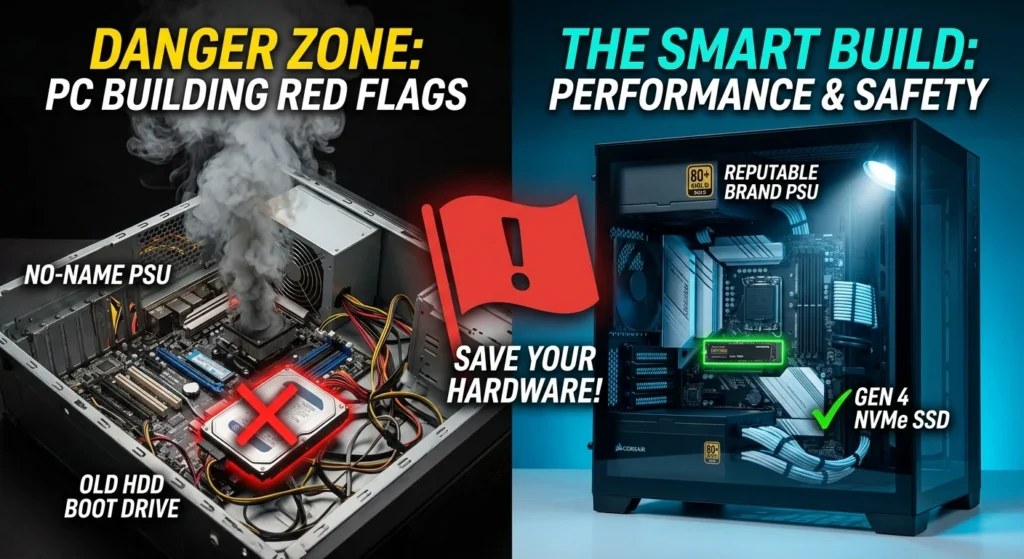
If you’re putting together a brand-new computer and your primary drive is a traditional mechanical hard disk drive, we need to talk. Using an HDD as a boot drive is easily one of the biggest PC building red flags. Modern operating systems and games are designed with high-speed solid-state drives in mind.
Now, if you have an older system that you’re keeping alive, or you grandfathered in an old drive because SSD prices have spiked lately, that’s totally fine. But for a fresh build, skipping an NVMe M.2 SSD is a massive mistake. Even a budget Gen 4 NVMe drive will make your system feel light-years faster than the best mechanical drive on the market.
2. The Fire Hazard Power Supply
It’s tempting to cut corners on the parts that don’t directly give you more frames per second. However, buying a cheap, unbranded, or no-name power supply is a recipe for disaster. A bad power supply isn’t just a performance bottleneck, it’s a literal fire hazard that can fry every single expensive component in your rig.
Always look for reputable brands and check reliable community tier lists before buying. If a deal on a 750-watt power supply looks too good to be true, it probably is.
3. Overkill Systems for Basic Tasks
We all love high-end hardware, but there’s a point where a build just becomes reckless. If you’re buying an AMD Ryzen 9 9850X3D and an Nvidia RTX 5090 just to play cozy indie games like Stardew Valley, you’re spending your money recklessly. Sure, we might be a little jealous of your hardware, but it’s still a massive red flag.
So what does that mean for you? It means you should match your hardware to your actual use case. Overspending on parts you’ll never fully utilize is money that could have been saved or spent on a better monitor, nicer peripherals, or just kept in your wallet.
4. Running Single-Channel RAM
Memory prices can be painful, but buying a single stick of RAM instead of a dual-channel kit is a massive performance trap. When you run a single stick, you’re cutting your memory bandwidth in half. Your CPU will constantly be waiting on data, which leads to stuttering and lower average frame rates in games.
Always buy your RAM in kits of two sticks. If your motherboard has four slots, make sure you put them in the correct slots to enable dual-channel mode, which is usually slots two and four. If you’re unsure about memory configurations, check out our guide on [how to install RAM correctly] to get it right the first time.
5. Spending Money in the Wrong Places
In the current market, you have to be incredibly intentional with every single dollar. A major red flag is overspending on components that don’t improve your daily experience while starving the parts that do. For example, spending a massive chunk of your budget on 64 gigabytes of RAM when 16 or 32 gigabytes is more than enough for your needs is a poor choice.
Instead of buying excessive memory or an overly expensive motherboard, allocate those funds toward a better graphics card or a higher-quality CPU cooler. Balance is everything.
Other Sneaky PC Building Red Flags to Watch For
The warning signs don’t stop at your parts list. The physical assembly process has its own set of traps that can ruin your hardware if you’re not careful.
Bad Airflow and Aesthetic-First Cases
We all want our systems to look amazing on our desks. But choosing a case with a solid glass front panel and zero ventilation is a massive red flag. Your CPU and GPU generate a ton of heat, and if your case can’t pull in fresh air, your components will thermal throttle and run loud. Prioritize mesh panels and good fan placement over pure aesthetics.
The High-End CPU and Low-End GPU Imbalance
This is a classic rookie mistake. Pairing a top-tier, expensive processor with an entry-level graphics card is a terrible way to build a gaming PC. Unless you’re building a machine specifically for heavy video editing or complex code compilation, your graphics card should be the most expensive component in your gaming build.
Quick Checklist: Is Your Build Free of Red Flags?
Before you hit the buy button, run through this quick checklist to make sure your system is balanced and safe:
- Storage: Do you have at least one fast NVMe M.2 SSD for your operating system?
- Power: Is your power supply from a reputable, well-reviewed brand?
- Memory: Are you using two sticks of RAM to enable dual-channel performance?
- Balance: Does your GPU match the tier of your CPU to avoid massive bottlenecks?
- Cooling: Does your case have a mesh front or plenty of ventilation for fresh air?
Now, this is where it matters. If you checked all those boxes, you’re well on your way to assembling a reliable, high-performance machine that will last for years. Keep your budget balanced, focus on quality where it counts, and don’t let flashy marketing distract you from what actually makes a great PC.