(302) 262 8484
What Hackers Look for First When Targeting a Device

When you connect a new phone, laptop, or smart thermostat to your network, you probably just want it to work. You’re not thinking about the microscopic cracks in its security. But those cracks are exactly what hackers look for first when targeting a device.
Cybercriminals are rarely the cinematic masterminds you see in movies. Most of the time they are just opportunists looking for the easiest way in. They run automated scripts to scan the internet for low-hanging fruit. If your hardware makes it easy, you become the target, which is why professional small business cybersecurity protection is so essential.
Here is a breakdown of the specific vulnerabilities attackers hunt for before they do anything else.
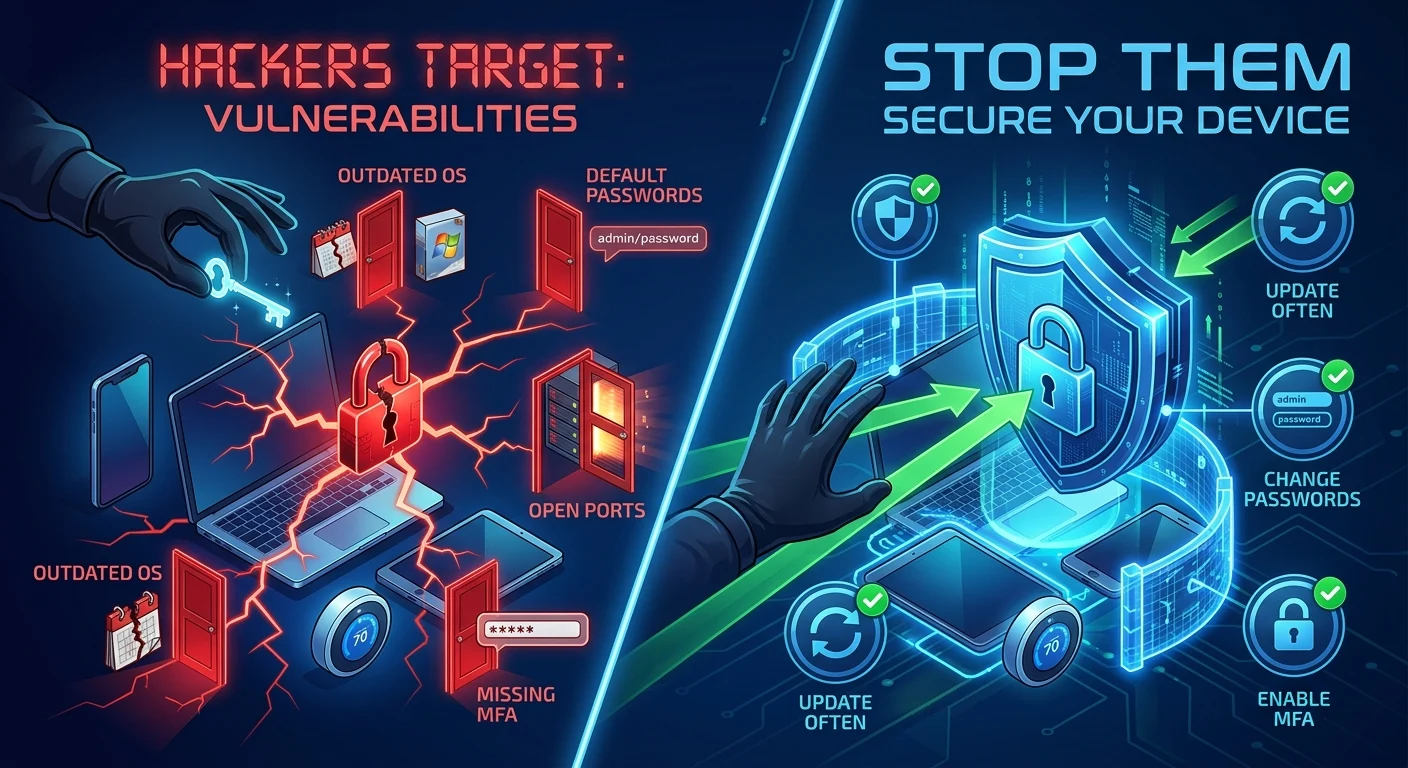
Outdated Operating Systems and Software
The absolute easiest way for an attacker to compromise your hardware is through old software. Unpatched systems are a goldmine.
When companies like Apple, Microsoft, or Google release security updates, they are essentially publishing a map of known vulnerabilities. Hackers read those update notes. They then write scripts to scan networks for devices that haven’t installed the patch yet. It’s a race against time. If you ignore those annoying update notifications, you are leaving the front door wide open.
Default Passwords on Smart Devices
We see this constantly with smart home tech and internet routers. You buy a cheap security camera, plug it in, and leave the login credentials as “admin” and “password”. This is a terrible practice.
Hackers maintain massive databases of default factory passwords for almost every device on the market. When they find your device online, they will just try the factory defaults first. It takes them less than a second to gain full control of the hardware.
Network Vulnerabilities: How Hackers Gain Access
Sometimes the device itself is locked down securely, but the way it talks to the internet is flawed. This brings us to network-level checks and the importance of proactive IT monitoring for small business.
Open Ports and Exposed Services
Think of your internet connection like a house with thousands of tiny doors. These are called ports. Most of them should be locked. If a hacker scans your IP address and sees certain ports left wide open, their eyes light up.
Remote Desktop Protocol is a prime example. It is incredibly useful for IT teams but a massive liability if left unsecured. Attackers will hit an open remote desktop port with automated brute-force attacks until they crack the password. Once they are in, they have the exact same access as if they were sitting at your physical desk.
Missing Multi-Factor Authentication
Let’s say a hacker manages to steal your password. If you don’t have Multi-Factor Authentication enabled, they win. It really is that simple.
Hackers actively look for accounts and devices that only require a single password. Multi-Factor Authentication adds a layer of friction that most automated attacks simply cannot bypass. Always turn this feature on if a platform offers it.
The Human Element
You can have the most secure operating system in the world. It won’t matter if you willingly hand over the keys.
Attackers know that tricking a human is often much faster than breaking a firewall. They look for users who click on suspicious email attachments or download sketchy third-party apps. Phishing remains one of the most reliable ways devices get compromised because it bypasses the technical security entirely.
How to Stop Hackers Before They Start
So what does that mean for you? You need to make your hardware harder to crack than the next person’s. Here is a quick checklist to secure your tech before an attacker finds it.
- Update everything immediately. Set your phones and computers to install security patches automatically overnight.
- Change all default passwords. Never leave a router or smart device with its factory settings. Create a unique passphrase.
- Enable two-step verification everywhere. Use an authenticator app rather than SMS text messages whenever possible.
- Disable features you don’t use. If you don’t need remote access or Bluetooth sharing, turn them off to reduce your attack surface.
- Audit your network. Check out our guide on [how to secure your home Wi-Fi network] for step-by-step instructions on locking down your router.
Hackers are lazy. They want maximum reward for minimum effort. By understanding what hackers look for first when targeting a device, you can systematically remove the easy access points. Make them work too hard, and they will simply move on to an easier target.