(302) 262 8484
The Hidden Spec: Why Frame Pacing Matters More Than Your FPS Counter

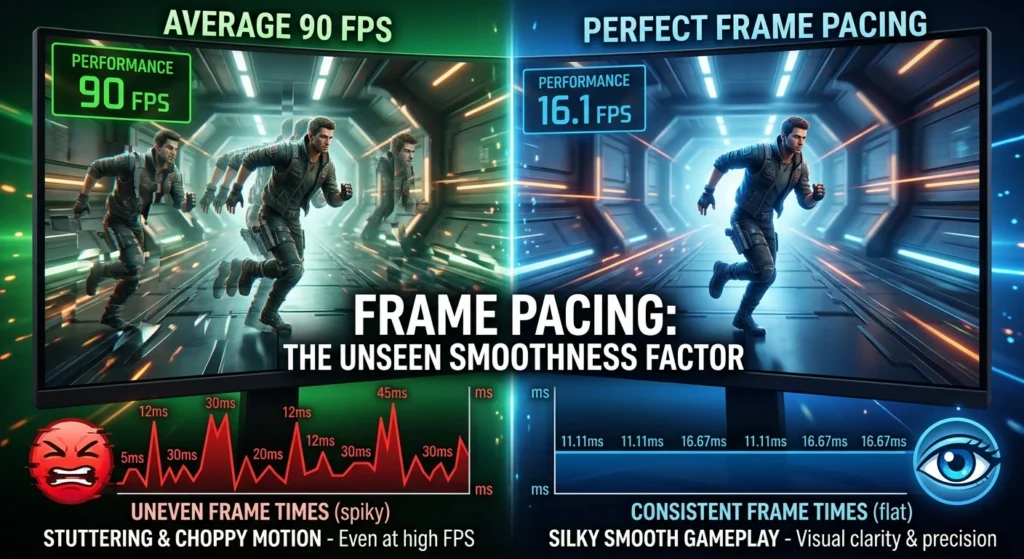
You just spent a small fortune on a brand-new graphics card, fired up your favorite game, and cranked the settings to the absolute max. Your on-screen performance overlay proudly displays a rock-solid 90 frames per second. Yet, the moment you pan the camera, the screen feels inexplicably choppy and uneven. You are experiencing the frustrating reality of poor frame pacing, the most overlooked technical factor in modern gaming.
What Exactly Is Frame Pacing?
Most gamers are obsessed with frame rate, which is simply a measure of how many frames your system renders in a single second. But here is the catch: frame rate is just a mathematical average. It tells you the quantity of frames, but it says absolutely nothing about when those frames actually arrive on your screen.
This is where frame pacing comes into play. Frame pacing refers to the consistency and timing between consecutive frames rendered by your graphics card. It is measured in milliseconds, and it dictates how smooth a game actually feels to your eyes.
To understand why this matters, let’s look at the math. If you are playing a game at 60 FPS, your hardware needs to deliver a new image to your monitor roughly every 16.67 milliseconds. If every single frame arrives precisely on that 16.67-millisecond mark, your gameplay will look incredibly smooth. But if your system delivers those 60 frames in erratic bursts, perhaps sending one frame in 5 milliseconds and the next in 30 milliseconds, the average still equals 60 FPS. Your eyes, however, will immediately register those uneven gaps as jarring micro-stutter.
Why Bad Frame Pacing Destroys the Gaming Experience
The human brain is incredibly sensitive to temporal consistency. When you are tracking a moving target in a competitive shooter or simply panning the camera to admire a scenic vista, your eyes expect motion to be fluid. When frame times spike and dip wildly, it breaks the illusion of continuous movement.
“A locked, perfectly paced 60 FPS will almost always look and feel smoother than a highly erratic 100 FPS that is constantly jumping around.”
This is why you can have a high-end PC running at triple-digit frame rates and still feel like your game is hitching. The raw horsepower of your GPU does not mean much if the game engine cannot distribute those frames at an even, predictable cadence.
The Common Culprits Behind Stuttery Frame Times
So, why do so many modern games struggle with this? The pipeline between a game engine rendering a frame and your monitor displaying it is incredibly complex. Several factors can easily throw off this delicate balance.
First, game engines often perform intensive tasks like loading assets, calculating physics, and handling audio on separate threads. If the CPU gets bogged down for even a fraction of a millisecond, it delays the render loop, causing a sudden spike in frame times. Second, background processes on your operating system can steal precious CPU cycles, which is why proactive IT monitoring for small business is essential to keep systems running efficiently.
Finally, we have the rise of cloud gaming. When streaming games, frames are rendered on a remote server and sent over the internet. Any tiny hiccup in your network connection or local decoding process can completely ruin your frame pacing, making the stream feel sluggish even if the remote server is running at a perfect frame rate.
How to Measure and Fix Your Frame Pacing
If you want to diagnose these issues, you need to stop looking at your basic FPS counter. Instead, you need to monitor your frame times. Tools like MSI Afterburner, RivaTuner Statistics Server (RTSS), and Intel PresentMon can display a real-time graph of your frame delivery. A flat, straight line on this graph represents perfect smoothness, while a jagged, spiky line indicates poor pacing.
Fortunately, you do not have to just live with the stutter. There are several highly effective ways to smooth out your frame delivery and reclaim a fluid gaming experience.
- Use a high-quality frame rate limiter: Built-in game limiters can sometimes be unreliable. External tools like RivaTuner Statistics Server use highly precise algorithms to cap your frame rate, ensuring that frames are released at exact, equal intervals.
- Enable Variable Refresh Rate (VRR): If you have a G-Sync or FreeSync monitor, make sure it is enabled (see our guide on [how to configure VRR for smooth gameplay]). VRR allows your monitor to dynamically adjust its refresh rate to match the exact moment your GPU outputs a frame, virtually eliminating tearing and smoothing out minor pacing fluctuations.
- Optimize your background tasks: Close resource-heavy applications, web browsers, and unnecessary launchers before starting a demanding game to prevent sudden CPU spikes.
The Ultimate Test of Smoothness
At the end of the day, frame pacing is the ultimate unsung hero of visual quality. It is a feature you will likely never think about when a game is running perfectly. But the moment it fails, no amount of high-resolution textures or ray-traced shadows can save the experience.
The next time a game feels strangely laggy or unresponsive despite showing a high frame rate, do not just assume you need a new graphics card. Take a close look at your frame times, lock down your pacing, and experience what true gaming smoothness actually looks like.