(302) 262 8484
The Ghost in the Machine: Why Deleted Files Aren’t Actually Deleted

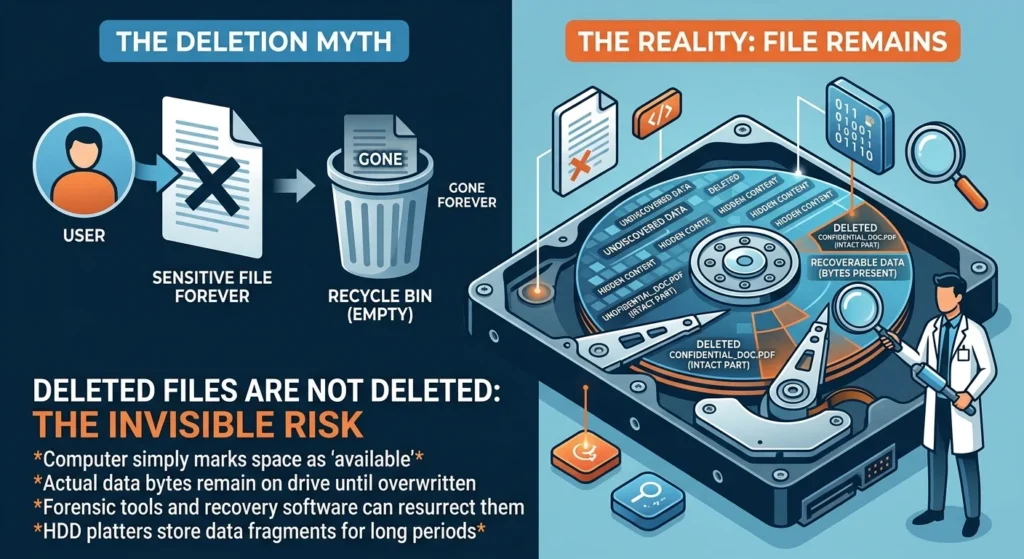
You drag a sensitive document to the Recycle Bin, click “empty,” and breathe a sigh of relief. It is gone forever, right? Wrong. In reality, understanding why deleted files aren’t actually deleted is one of the most eye-opening lessons in digital privacy and computer security.
When you delete a file, your operating system does not grab a digital eraser and scrub the physical drive. Instead, it takes a massive shortcut to save time and system resources. If your computer had to overwrite every single byte of a file every time you clicked delete, your system would constantly freeze and crawl to a halt, which is often a sign that you may need PC upgrades in Delaware to maintain performance.
The Great Digital Deception: What Happens When You Press Delete?
If you didn’t overwrite the sector, you didn’t delete the file.
To understand why deleted files aren’t actually deleted, think of your storage drive like a massive library book. Every file has an entry in the table of contents, which is known as the file system index. When you hit delete, the computer simply crosses the entry off that table of contents.
The actual pages of the book, which contain your data, remain completely untouched. The operating system just flags that physical space as “available” for future writes. Until something else comes along and overwrites those exact blocks, your file is still sitting on your drive.
Why Deleted Files Aren’t Actually Deleted on HDDs
Traditional Hard Disk Drives, or HDDs, are the ultimate hoarders. Because they write data to spinning magnetic platters, they can easily leave deleted files intact for weeks, months, or even years, making it essential to have reliable IT infrastructure for small businesses to manage data lifecycles.
Since overwriting data takes physical work, the system waits until it absolutely needs that space to write a new file. Here is the thing: if your drive is not full, your old files might sit there undisturbed for a very long time.
How Forensic Experts and Recovery Software Resurrect Your Data
Because the raw bytes of your files are still sitting on the drive, recovery software can easily scan the disk for these unlinked files. By analyzing the raw sectors, these tools can rebuild the file structure and bring your deleted photos, tax documents, or private messages back from the dead.
This is why forensic investigators can recover evidence from computers even after suspects think they have wiped their drives. If you want to know more about keeping your system safe, see our guide on small business cybersecurity protection.
Enter the SSD: How TRIM Changes the Game
If you are using a modern Solid-State Drive, or SSD, the story of why deleted files aren’t actually deleted gets a bit more complicated. SSDs use NAND flash memory, which cannot simply overwrite existing data on the fly.
To write new data, an SSD must first erase a large block of memory before writing to smaller pages inside it. This is where a technology called TRIM comes in to save the day.
Why Deleted Files Aren’t Actually Deleted Forever on SSDs
To keep things running fast, modern operating systems use the TRIM command. When you delete a file, the operating system sends a TRIM command to the SSD controller, marking those specific blocks of data as invalid.
Now, this is where it matters. The data is not gone immediately, but it is scheduled for destruction.
Garbage Collection: The Silent Sweeper
During idle times, a background process called garbage collection actually wipes those marked blocks. Once garbage collection runs, that data is physically erased from the NAND cells.
So what does that mean for you? On an SSD, your deleted files actually do get permanently deleted, often within minutes or hours. This makes data recovery on SSDs incredibly difficult and highly time-sensitive.
How to Make Sure Your Data is Truly Gone
If you are selling a computer, throwing away an old hard drive, or just handling highly sensitive information, you cannot rely on the standard delete button. Relying on a quick format is a terrible practice that leaves your private life exposed to anyone with free recovery software.
Here is how to ensure your files are permanently gone:
- Use Secure Shredding Tools: Programs like SDelete write random patterns of ones and zeros over the file’s physical location multiple times, rendering it completely unrecoverable.
- Perform a Full Format: Never use “Quick Format” when preparing a drive for a new owner. A full format actually overwrites the entire drive, whereas a quick format just wipes the file system index.
- Enable Drive Encryption: If your drive is encrypted using BitLocker or FileVault, even if someone recovers your deleted files, they will only see a scrambled mess of unreadable code.
The Takeaway for Your Privacy
Next time you empty your trash folder, remember that digital deletion is mostly an illusion. Unless you take active steps to overwrite your storage or let your SSD’s TRIM command do its job, your digital ghosts are still lingering in the machine.