(302) 262 8484
Cloud vs On-Premise: Making the Right Choice

Deciding between cloud vs on-premise infrastructure is a choice between renting flexible digital space or buying and managing your own physical hardware. It is one of the biggest technical choices a company can make. It directly impacts your budget, data security, and how your team works every day. You might be wondering if you should keep your servers in the office or move everything to a remote data center. There is no single right answer for everyone. The best choice depends entirely on your specific business needs and long-term goals.
Let us break down exactly what each option means so you can make an informed decision for your company.
What Is On-Premise Infrastructure?
On-premise refers to keeping your IT infrastructure local. You buy the servers, install them in your building, and manage everything yourself. Your IT team is responsible for routine maintenance, software updates, and fixing hardware when it breaks.
This is the traditional way businesses have handled their technology for decades. It gives you absolute ownership over your systems.
Pros of Local Servers
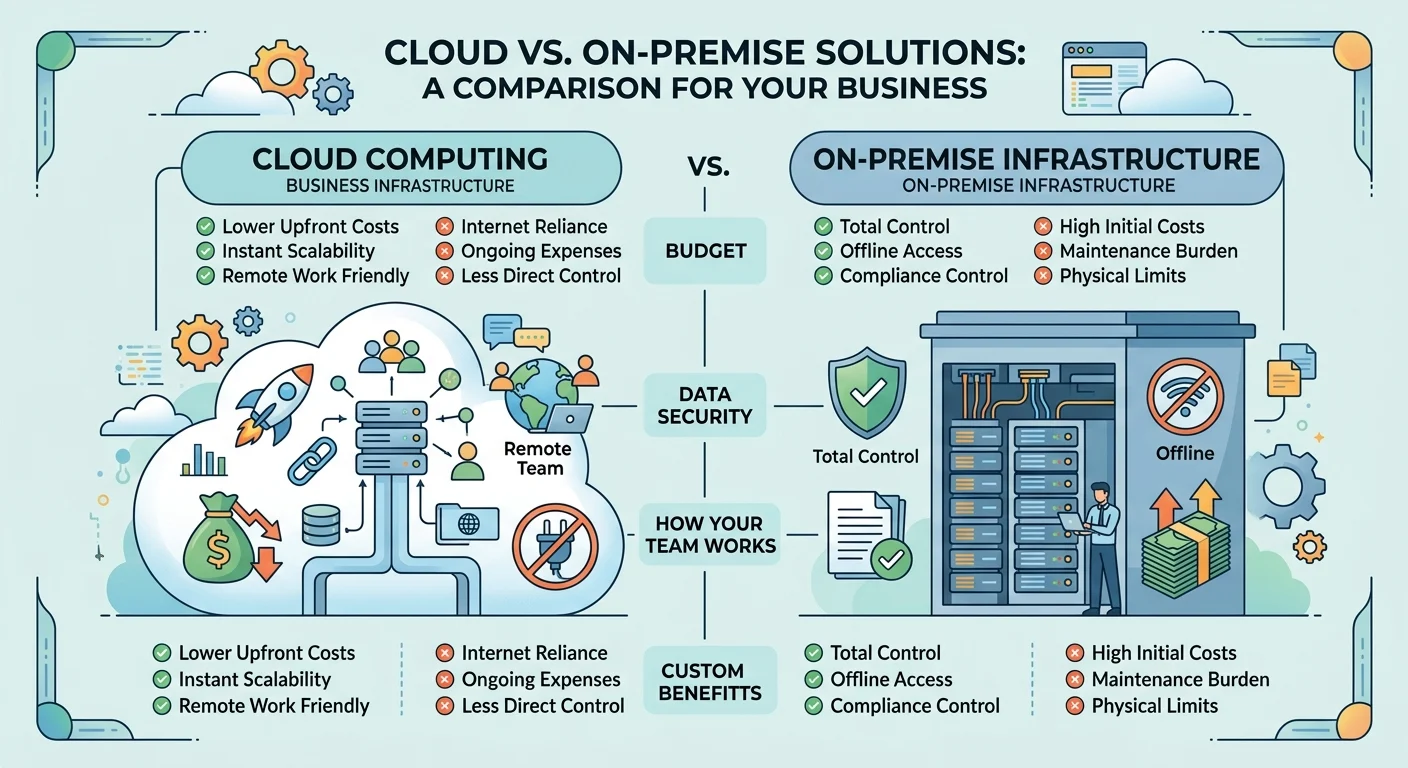
- Total control: You own the hardware and dictate exactly how your data is stored and handled.
- Offline access: Your team can still access internal networks and files even if the local internet goes down.
- Compliance control: It is often easier to meet strict regulatory rules when you physically control the servers.
Cons of Keeping Things Local
- High initial costs: Buying enterprise-grade servers and networking gear requires a massive upfront investment.
- Maintenance burden: You need a dedicated IT staff to keep things running, apply security patches, and replace failing parts.
- Physical limits: Servers take up valuable office space and require specialized cooling systems to prevent overheating.
What Is Cloud Computing?
Cloud computing means you rent server space from a third-party provider like Amazon Web Services, Microsoft Azure, or Google Cloud. The provider owns and maintains the physical hardware in their massive data centers. You simply access your data and applications over the internet.
Instead of buying hardware, you pay for the computing power and storage you actually use.
Pros of Moving to the Cloud
- Lower upfront costs: You pay a predictable monthly subscription instead of buying expensive equipment.
- Instant scalability: You can add or remove storage and computing power with a few clicks.
- Remote work friendly: Your team can access files and applications from anywhere with an internet connection.
Cons of Cloud Environments
- Internet reliance: If your office loses its internet connection, you lose access to your cloud-based tools.
- Ongoing expenses: While upfront costs are low, monthly subscription fees can add up significantly over the years.
- Less direct control: You are trusting a third party to secure and maintain the physical hardware holding your data.
Cloud vs On-Premise: Key Differences Compared
When you put cloud vs on-premise solutions side by side, a few major operational differences stand out. Understanding these contrasts is the key to picking the right path.
Evaluating Cloud vs On-Premise Costs
On-premise requires a massive initial capital expense. You are buying servers, software licenses, and networking cables. Once you buy it, you own it. Cloud computing shifts this to an operating expense. You pay a monthly fee based on your usage. Startups often prefer the cloud because it keeps their initial costs low, while established enterprises might prefer the predictable long-term math of owning their hardware.
Security and Data Privacy
People used to think the cloud was less secure than a locked server room. That is rarely true anymore. Major cloud providers spend billions on security protocols that most small businesses could never afford. They have dedicated teams monitoring for threats around the clock.
However, if you work in highly regulated fields like healthcare or finance, an on-premise setup might be legally required. Some regulations mandate that data cannot leave certain geographic locations. You can check out our related guide on [data compliance standards] to see if your industry has specific local storage requirements.
Scaling Your Business
Growth is exciting but it can stress your IT systems. If an e-commerce site goes viral, a local server might crash under the heavy traffic. Upgrading that local server takes days or weeks because you have to order, wait for, and install new parts. In a cloud environment, you can instantly double your server capacity to handle the rush and scale it back down when traffic normalizes.
Is a Hybrid Approach the Best of Both Worlds?
You do not necessarily have to pick just one. Many growing companies use a hybrid cloud approach. They keep their most sensitive customer data on local servers to maintain strict compliance. At the same time, they run everyday applications and email servers in the cloud.
This setup gives you the tight security control of on-premise infrastructure combined with the agility of cloud computing. It requires careful planning to set up, but it is often the perfect middle ground for mid-sized businesses.
Key Takeaways: Which Should You Choose?
The cloud vs on-premise debate really comes down to your budget structure, your IT resources, and your security needs. Neither option is inherently better than the other.
- Choose on-premise if: You have strict legal compliance requirements, need guaranteed offline access, or already have a large IT team ready to manage physical hardware.
- Choose the cloud if: You want to avoid huge upfront costs, need to support a remote workforce, and want the ability to scale your resources instantly.
Take a close look at your current business goals and your available budget. Whichever path you choose, make sure it aligns with where your company is heading over the next five years.