(302) 262 8484
The Silent Cash Drain: How to Find and Cancel Forgotten App Subscriptions

Imagine opening your bank app and realizing you are paying for services you haven’t used in months. It starts with a silent monthly charge of $4.99 here, a $14.99 renewal there, and suddenly you are bleeding cash every single month through forgotten app subscriptions. You are not alone in this. Most of us are completely blind to where our digital dollars are going, and it is quietly costing us hundreds of dollars every year.
The True Cost of Forgotten App Subscriptions
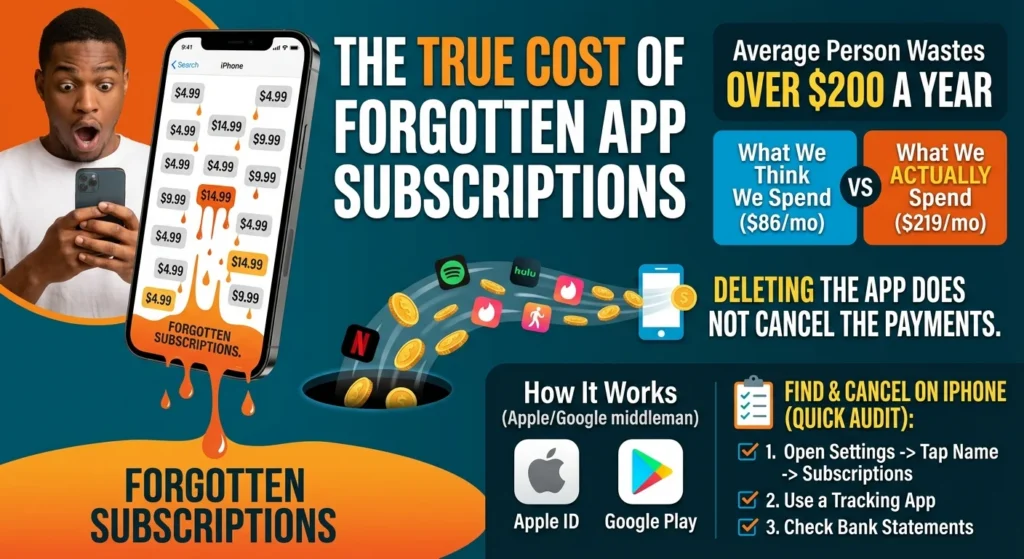
Here’s the thing: we are terrible at estimating our subscription spending. Research shows that the vast majority of consumers underestimate their monthly digital expenses by a factor of nearly three. While many people estimate they spend around $86 a month, the actual average is closer to $219. That is a massive perception gap.
According to surveys, the average person wastes over $200 a year on forgotten app subscriptions they do not even use. For businesses, this passive billing is a goldmine. For your personal finances, it is a slow, steady bleed. If you do not actively manage these charges, you are essentially throwing money away, which is why many business owners rely on professional IT consulting to streamline their digital operations.
How Smartphone Subscriptions Work Behind the Scenes
To stop the bleeding, you need to understand how these charges happen. When you sign up for an app subscription, you usually do not pay the developer directly. Instead, Apple or Google acts as the middleman.
On iOS, your purchases are tied to your Apple ID. On Android, they go through your Google Play account. This makes signing up incredibly friction-free, though it often leads to security vulnerabilities if you are not careful about which mobile repair services or app permissions you authorize. A quick double-click of the power button or a scan of your fingerprint, and you are subscribed. So what does that mean for you? It means deleting the app from your screen does not actually stop the payments from running in the background.
How to Find and Cancel Subscriptions on iPhone
If you use an iPhone, Apple makes it relatively simple to see what you are paying for, provided you know where to look. Let’s do a quick audit right now, similar to how you should regularly review your small business cybersecurity protection to ensure no unauthorized access is occurring.
Finding Forgotten App Subscriptions on iOS
Grab your phone and follow these steps:
- Open the Settings app on your iPhone.
- Tap your name at the very top of the screen.
- Tap on Subscriptions.
- Review the list under the Active section.
- Tap any service you no longer need and select Cancel Subscription.
Once you cancel, you will usually still have access to the service until the end of your current billing period. This means you can cancel early without losing out on what you already paid for.
How to Find and Cancel Subscriptions on Android
If you are on an Android device, your subscriptions are managed through the Google Play Store. Uninstalling an app will not cancel your payments, so you need to manually turn them off, a process that can be simplified by using proactive IT monitoring for small business tools to track your digital footprint.
Finding Forgotten App Subscriptions on Android
Here is how to stop those recurring charges on your Android phone:
- Open the Google Play Store app.
- Tap your profile icon in the top right corner.
- Select Payments & subscriptions, then tap Subscriptions.
- Look through your active subscriptions.
- Tap the one you want to end, select Cancel subscription, and follow the prompts to confirm.
Real-World Examples of Common Forgotten App Subscriptions
So what are the main culprits draining your wallet? Some of the most common forgotten app subscriptions hide in plain sight.
Food Delivery Passes
Many of us signed up for premium delivery passes like DoorDash, Grubhub, or Uber Eats during a busy month. Shockingly, studies show that nearly half of food delivery subscribers do not even use their active memberships. If you are paying $10 to $15 a month for a delivery pass and only ordering once every few weeks, you are losing money.
The Free Trial Trap
We have all signed up for a 7-day free trial to edit a single photo, track our steps for a week, or watch a specific documentary. Nearly half of consumers forget to cancel these trials before they roll over into paid monthly plans. By the time you notice the charge on your bank statement, you might have already paid for three months of a service you do not want.
Cloud Storage Top-Ups
You get a notification that your phone storage is full, so you upgrade to a larger iCloud or Google One plan for a small fee. It seems small, but over time, these tiny storage upgrades add up, especially if you have cleaned out your files and no longer need the extra space.
Your Monthly Digital Spending Audit Checklist
Now, this is where it matters. To keep your money in your pocket, you need a system. Use this quick checklist once a month to keep your digital spending in check:
- Check your app store settings: Spend two minutes reviewing your active subscriptions on iOS or Android using the steps above.
- Scan your bank statements: Look at your last three months of transactions for recurring charges you might have missed.
- Search your email inbox: Search for terms like “renewal,” “receipt,” or “subscription” to catch annual charges before they hit.
- The 30-day rule: If you have not opened an app in the last 30 days, cancel the subscription immediately. You can always resubscribe later if you truly miss it.
Taking just fifteen minutes a month to run through this checklist can save you hundreds of dollars a year. Stop letting silent monthly charges drain your bank account, and take control of your digital wallet today.