(302) 262 8484
Making Sense of the Different Versions of Wi-Fi

Buying a new router used to feel like reading a secret code. You would stare at a box covered in letters like 802.11ac or 802.11n and just hope you were making the right choice. Thankfully, things have gotten a bit easier to understand.
If you are trying to make sense of the different versions of Wi-Fi and their differences, you are in the right place. Let’s break down exactly what these numbers mean and whether you actually need to upgrade.
Before we look at the specific speeds and features, we need to talk about the naming system. For a long time, the Wi-Fi Alliance used a confusing technical naming convention based on the IEEE 802.11 standard.
It was a marketing nightmare.
Nobody wants to remember a string of random letters. So a few years ago, the industry finally wised up. They retroactively renamed the standards to a simple numbering system to help regular people figure out what they were buying.
A Breakdown of Wi-Fi Versions and Their Differences
The jump from one generation to the next usually brings three main improvements. You get faster top speeds, better range, and the ability to handle more devices at once. Here is a quick look at how the different generations stack up.
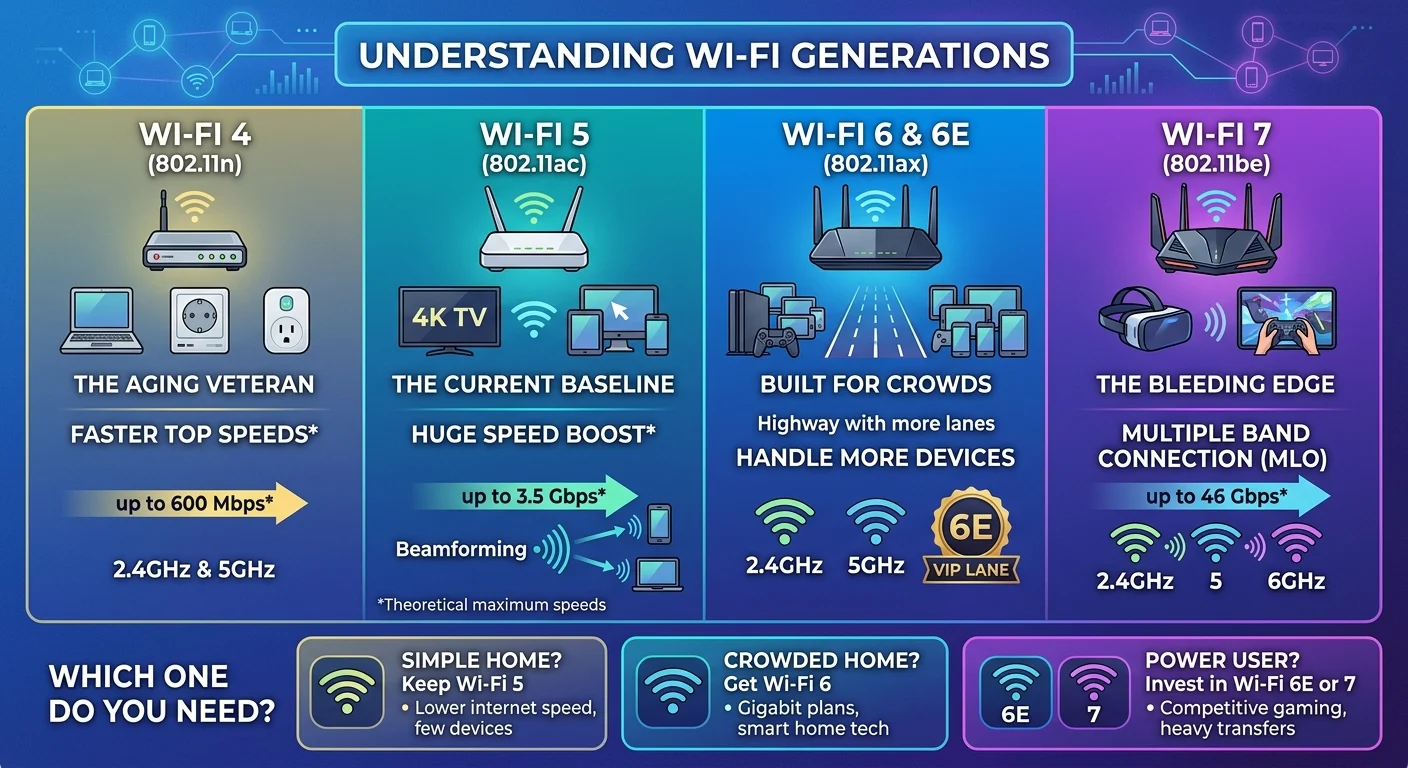
Wi-Fi 4 (802.11n): The Aging Veteran
Released back in 2009, Wi-Fi 4 was a massive deal at the time. It was the first version to operate on both the 2.4GHz and 5GHz bands.
You probably still have a few older smart home devices running on this standard. While it maxes out at around 600 Mbps, it is painfully slow by modern standards. It will absolutely struggle if you have multiple people streaming video at once. If your main router is still Wi-Fi 4, it is definitely time for an upgrade, and you might consider the hidden power of incremental tech upgrades to improve your home network.
Wi-Fi 5 (802.11ac): The Current Baseline
This hit the market in 2014 and it is probably what you are using right now. Wi-Fi 5 brought a huge speed boost by focusing heavily on the 5GHz band.
It can theoretically hit speeds up to 3.5 Gbps. More importantly, it introduced better beamforming. That is just a fancy way of saying the router can target its signal directly at your laptop instead of broadcasting it blindly in all directions. It is still perfectly fine for most standard home networks.
Wi-Fi 6 and 6E (802.11ax): Built for Crowds
Now this is where it gets interesting. Wi-Fi 6 launched in 2019 with a focus on capacity rather than just raw speed.
Think of your wireless network like a highway. Wi-Fi 5 increased the speed limit. Wi-Fi 6 added more lanes.
It is designed to handle dozens of devices simultaneously without breaking a sweat. This is crucial if you have a house full of smart TVs, phones, tablets, and smart plugs.
Then came Wi-Fi 6E. The letter E stands for extended. It opened up a brand new 6GHz band. This is effectively a VIP lane for your newest devices, completely free from the interference of older tech.
Wi-Fi 7 (802.11be): The Bleeding Edge
Wi-Fi 7 is the newest kid on the block. It promises speeds up to 46 Gbps. That is nearly five times faster than Wi-Fi 6.
But the real magic of Wi-Fi 7 is a feature called Multi-Link Operation. Older versions force your phone to choose between the 2.4GHz, 5GHz, or 6GHz bands. Wi-Fi 7 lets compatible devices connect to multiple bands at the exact same time. It drastically reduces latency, which is a massive win for competitive gamers and VR users.
Check out our guide on [how to optimize your home network for gaming] if you want to dive deeper into latency fixes.
Which Version Do You Actually Need?
It is easy to get caught up in the hype of massive gigabit speeds. But you probably do not need the absolute newest hardware.
Here is the thing. Your internet connection is only as fast as the weakest link in the chain. If you pay your internet service provider for a 500 Mbps plan, a fancy Wi-Fi 7 router will not magically give you 2 Gbps speeds.
Quick Buying Guide
Before you drop a few hundred dollars on new networking gear, figure out where your household actually fits.
- Stick with Wi-Fi 5 if: You have a smaller home, internet speeds under 500 Mbps, and fewer than 15 connected devices.
- Upgrade to Wi-Fi 6 if: You have a gigabit internet plan, a house full of smart home gadgets, or a large family streaming 4K video at the same time.
- Invest in Wi-Fi 6E or 7 if: You are a hardcore competitive gamer, you transfer massive files locally, or you just love future-proofing your tech setup.
Upgrading your network hardware is an investment. Just make sure you are buying the technology that matches how you actually use the internet.