(302) 262 8484
Signs Your Webcam Is Being Watched Right Now (And How to Stop It)

You sit down at your computer, log in, and start working. But as you type, a chilling thought crosses your mind: is that tiny lens at the top of your screen staring back at you? It sounds like a plot from a Hollywood thriller, but webcam hacking is a very real threat that often requires expert IT consulting to properly mitigate. Knowing the Signs Your Webcam Is Being Watched Right Now is the first line of defense in protecting your personal space from digital voyeurs.
The Reality of Webcam Hacking
Many people assume that webcam spying requires high-level, cyber warfare. Here’s the thing: it usually doesn’t. Everyday hackers often exploit basic security gaps like weak passwords, outdated software, or sneaky malware known as Remote Access Trojans. These tools give bad actors total control over your device, including the ability to turn on your camera and record your every move.
Major Signs Your Webcam Is Being Watched Right Now
If you suspect someone has hijacked your camera, you need to look for specific red flags. While some hackers are incredibly stealthy, they almost always leave behind digital footprints.
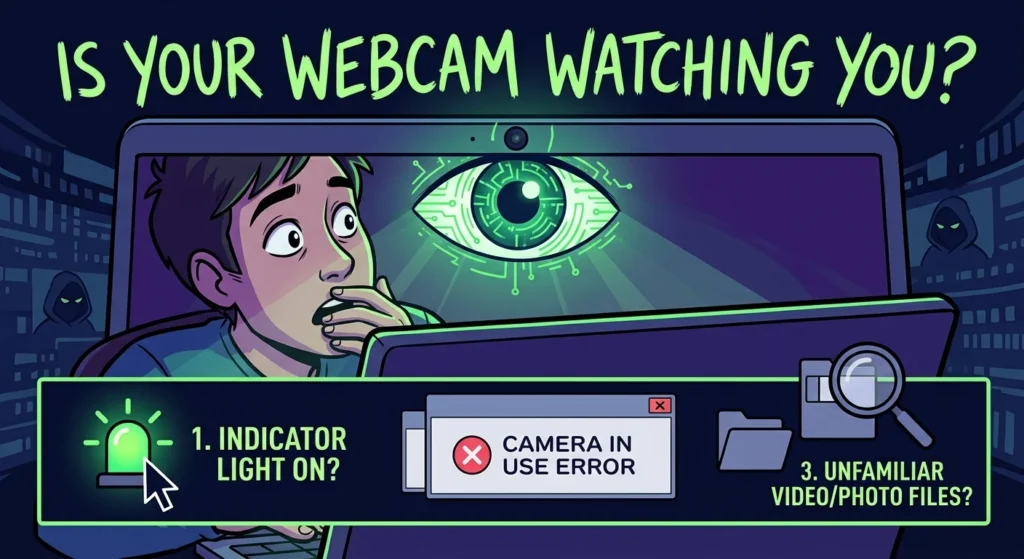
1. The Indicator Light: Classic Signs Your Webcam Is Being Watched Right Now
The most obvious warning sign is the tiny LED light next to your camera lens. If this light turns on or blinks when you are not actively using a video app, someone else might be pulling the strings. Now, this is where it matters: sophisticated malware can actually disable this light entirely while keeping the camera active. So, while a glowing light is a clear warning, a dark light does not automatically mean you are safe.
2. You Receive ‘Camera in Use’ Error Messages
Have you ever tried to join a video call only to get an error saying your camera is already in use by another application? If you do not have any other video programs open, this is a major red flag. It often means a background spyware process has already locked onto your webcam, blocking legitimate access.
3. Strange Video and Photo Files in Your Storage
Webcam hackers do not just watch you in real-time. They often record footage to use for extortion or sale on the dark web. Check your default saving folders for pictures and videos. If you find unfamiliar media files that you have no memory of taking, your camera has likely been hijacked, and you should immediately contact a malware removal service in Delaware to scrub your device.
4. Unexplained Network Traffic and Rapid Battery Drain
So what does that mean for you? Video files are large, and sending them back to a hacker’s server requires a massive amount of upload bandwidth. If your internet connection suddenly slows down, or your laptop battery drains rapidly and runs hot for no apparent reason, background data transfer is a highly probable culprit.
5. Altered Security and Admin Settings
To keep themselves from being detected, hackers will often modify your system settings. They might disable your antivirus software, change your administrator credentials, or alter your camera permissions. If you notice your security settings look a bit screwy, you should consult with a professional regarding small business cybersecurity protection to ensure your system is fully locked down.
How to Check if Your Webcam Is Active Right Now
If you want to move past guesswork and get concrete proof, you can use built-in system tools to see exactly what is happening under the hood.
- Check Process Explorer (Windows): You can download Microsoft’s Process Explorer to find out which active process is currently utilizing your webcam device.
- Review App Permissions: Go to your system settings and check which applications have permission to access your camera. Revoke access for anything suspicious. For more on this, see our guide on [protecting your digital privacy].
- Monitor Network Usage: Use the Task Manager or Activity Monitor to see if any unknown background tasks are consuming massive amounts of data.
Immediate Steps to Take If You Are Being Watched
If you realize your camera has been compromised, do not panic. Take these immediate steps to shut down the intruder and reclaim your privacy.
- Disconnect from the Internet: Unplug your router or turn off Wi-Fi. This instantly cuts off the hacker’s remote connection to your device.
- Cover the Lens: Place a physical webcam cover, a piece of dark tape, or even a sticky note over the camera lens. It is simple, but it is 100% effective at blocking their view.
- Run a Deep Malware Scan: Use a reputable antivirus program to scan your entire system and quarantine any Remote Access Trojans or spyware.
- Update All Credentials: Change your passwords for your computer, your email, and your router. Always use strong, unique passwords for every account.
At the end of the day, a physical webcam cover is the cheapest and most reliable insurance policy you can buy. Do not rely solely on software to protect your privacy when a simple piece of plastic can keep snoopers in the dark.