(302) 262 8484
Why Driver Updater Programs Are Usually a Waste of Money

You have probably seen the warning pop-ups or online ads claiming your computer is running slow because of ‘critically outdated’ drivers. They promise a magic, one-click solution to speed up your PC, provided you pay for their premium subscription. But here is the honest truth: third-party driver updater programs are almost always a complete waste of your hard-earned money.
In fact, these tools are often worse than useless, and if you have already installed them, you may need professional virus and spyware removal to clean up the mess. They can introduce stability issues, bundle unwanted software, and trick you into paying for functions that your operating system already does for free. Let us dive into why you should steer clear of these utilities and how you can keep your computer running smoothly without spending a dime.
The Predatory Marketing Behind Driver Updater Programs
How Driver Updater Programs Exploit Users
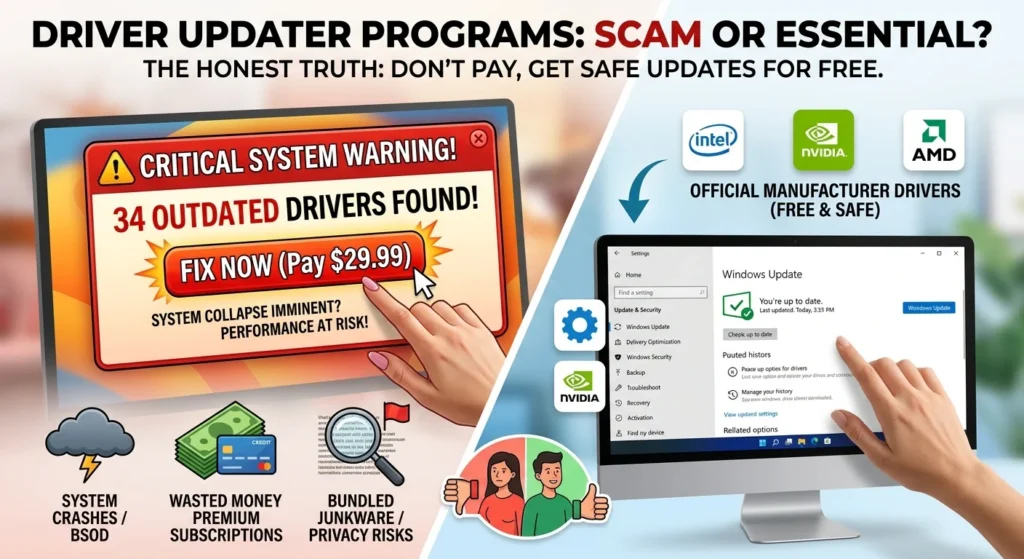
Here is the thing about commercial driver updaters: they rely on fear to make a sale. When you run a free scan with one of these tools, it will almost certainly flag dozens of ‘outdated’ drivers in bright red text. They want you to panic and believe your system is on the verge of collapsing.
But hardware drivers do not work like smartphone apps. They do not need constant updates just to stay relevant. For the vast majority of your computer components, the driver installed when you set up the PC is perfectly fine.
Unless you are experiencing a specific hardware issue, there is absolutely no reason to touch them, but if you do encounter persistent problems, it is best to consult experts in PC repair in Delaware. In the PC world, the golden rule always applies: if it is not broken, do not fix it.
Why Third-Party Driver Updater Programs Can Harm Your PC
Using an uncertified, third-party utility to manage your system files is a recipe for disaster. These programs do not have a special relationship with your hardware manufacturers. Instead, they scrape the internet for driver files and often install the wrong versions, leading to system crashes, blue screens of death, and broken hardware functionality.
Beyond system instability, these utilities pose significant security and privacy risks. Here is what you are actually getting when you install them:
- Bundled Bloatware and Adware: Many free driver updaters bundle unwanted software, search bars, or trial antivirus programs that clog your system resources.
- Misleading Scareware Tactics: They constantly prompt you to upgrade to a paid version to fix non-existent problems, acting more like malware than helpful software.
- Uncertified Drivers: These tools often install outdated, generic, or uncertified drivers that bypass the rigorous testing protocols established by Microsoft.
So what does that mean for you? You are paying a premium price for a tool that is actively making your computer less secure and more unstable, which is why we recommend proactive IT monitoring for small business owners to keep systems healthy.
How to Update Drivers Safely and for Free
You do not need to buy expensive software to keep your computer healthy, as there are many affordable PC and mobile services available to help you maintain your hardware. Modern operating systems and hardware manufacturers have already built reliable, free systems to handle this exact task, but if your machine is still sluggish, you might consider professional PC upgrades in Delaware.
Windows Update Does the Heavy Lifting
If you are running Windows 10 or Windows 11, Microsoft already manages your drivers automatically. When hardware manufacturers release stable, certified drivers, they submit them to Microsoft. These updates are then quietly delivered to your PC through standard Windows Updates. It is seamless, thoroughly tested, and entirely free.
Official Manufacturer Tools are Safer
If you want to ensure your system is perfectly optimized, skip the generic third-party tools. Instead, rely on the official, free software provided directly by your device creator. These tools are designed specifically for your hardware model and do not bundle malicious software.
Depending on your computer brand, you should use these official tools:
- Lenovo Vantage: For Lenovo laptops and desktops.
- Dell SupportAssist: For Dell and Alienware systems.
- HP Support Assistant: For HP devices.
- Intel Driver & Support Assistant: For Intel processors, Wi-Fi cards, and integrated graphics.
- NVIDIA App or AMD Software: For dedicated gaming graphics cards.
These official programs identify your exact hardware, provide validated updates, and even handle critical firmware or BIOS updates safely.
When Manual Driver Updates Actually Make Sense
Now, this is where it matters. There are a few specific scenarios where manually searching for and installing a driver is the right move. But even then, you should download them directly from the official manufacturer website, never a third-party updater.
Upgrading Graphics Drivers for Gamers
If you play modern PC games, keeping your graphics card driver updated is essential. Companies like NVIDIA and AMD release frequent updates optimized for newly released games. Downloading the official desktop software for your graphics card will ensure you get these performance boosts automatically.
Troubleshooting Specific Hardware Malfunctions
If your Wi-Fi keeps dropping, your audio is crackling, or a USB port suddenly stops working, manually reinstalling that specific driver can solve the problem. In these cases, you should open the Windows Device Manager, identify the malfunctioning component, and update or reinstall it directly.
Smart PC Maintenance Without the Bloatware
Maintaining a fast, secure computer does not require a suite of paid optimization tools. Instead of downloading shady utilities, focus on a few simple habits. Keep Windows updated, download software only from official developer websites, and use the built-in Windows Security tool to scan for threats. By avoiding predatory driver updater programs, you will save your money and keep your computer running exactly the way it was designed to.