(302) 262 8484
The Silent Drain: How Your Browser Extension Is Secretly Stealing Your Crypto

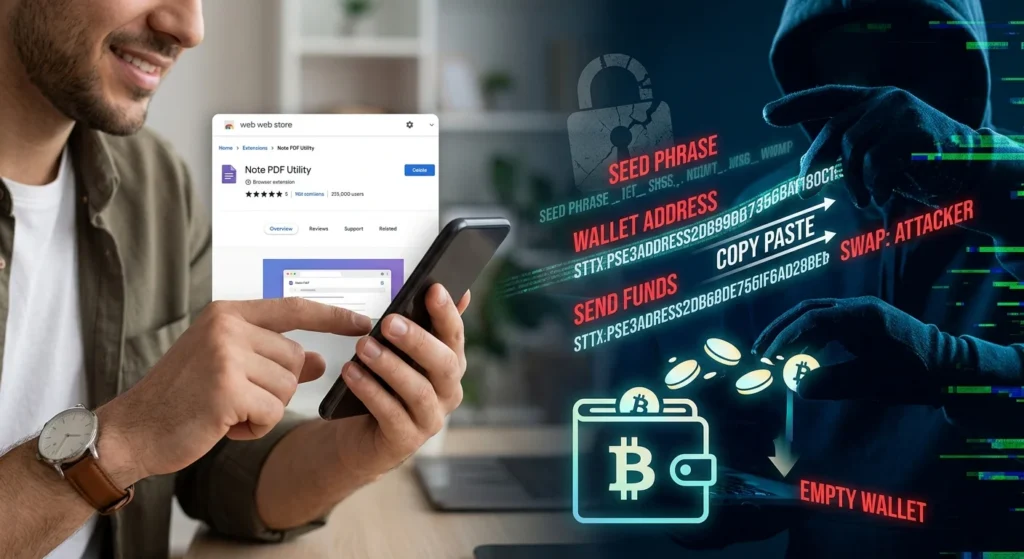
You install a harmless-looking PDF reader, a notes app, or a translation tool, and suddenly your digital wallet is empty. It sounds like a paranoid nightmare, but a malicious browser extension stealing your crypto is a very real, rapidly growing threat that requires robust Small Business Cybersecurity Protection. Hackers are hijacking trusted add-ons and publishing fake tools directly to official web stores to intercept your transactions, copy your seed phrases, and drain your funds without you ever realizing it.
How Malicious Extensions Hijack Your Wallet
Here is the thing about browser extensions: they run with incredibly high privileges. Once you grant them permission to read and change data on the websites you visit, they can see almost everything you do. This makes them the perfect weapon for crypto thieves.
Recently, cybersecurity researchers have uncovered massive campaigns showing just how vulnerable our browsers have become. In mid-2026, a campaign dubbed Silent Swap was caught disguising itself as a benign Google Notes utility. Once installed, it silently monitors your clipboard. The moment you copy a crypto wallet address to make a payment, the extension swaps it with the attacker’s address, which is why you should utilize professional Virus and Spyware Removal to keep your system clean. Because blockchain transactions are irreversible, your funds are gone forever with a single click.
Even worse, you cannot always trust tools that have been safe for years. Take the case of QuickLens, a popular search utility with thousands of users. After an ownership change in early 2026, the new owners pushed a malicious update that stripped security headers and targeted cryptocurrency seed phrases. A tool that was completely safe on Monday became a digital pickpocket by Tuesday.
The Direct Threat: A Browser Extension Stealing Your Crypto
How do these bad actors get past the security of official marketplaces? The reality is that web stores are struggling to keep up with the volume of submissions. Hackers use clever disguises to slip through the cracks and build trust with unsuspecting users, often targeting those who lack proper IT Consulting to identify these digital red flags.
A prime example is the Safery malicious extension, which posed as a legitimate Ethereum wallet. It managed to climb to the fourth spot in Chrome Web Store search results for Ethereum wallets. Instead of keeping funds safe, it secretly recorded users’ seed phrases. To avoid detection by security scanners, it encoded the stolen seed phrases into microtransactions on a completely different blockchain. It literally smuggled private keys out of the browser in plain sight.
The Sneaky Tactics: Clipboard Swapping and Steganography
Now, this is where it matters. Threat actors are no longer just writing obvious malware. They are using highly sophisticated techniques to hide their tracks and bypass standard antivirus software, making it essential to implement Proactive IT Monitoring for Small Business to catch threats early.
Some campaigns, like the GhostPoster operation discovered in early 2026, use steganography. This technique hides malicious code inside harmless-looking logo images and graphics. The browser loads the image, decodes the hidden script, and starts monitoring your activity. Others focus entirely on clipboard manipulation, knowing that most crypto users copy and paste long, complex wallet addresses rather than typing them out manually.
How to Protect Your Digital Assets from Malicious Add-ons
So what does that mean for you? You do not have to completely abandon browser extensions, but you do need to change how you use them. Protecting your digital wealth requires a mix of skepticism and strict security habits.
Here is a checklist of steps you should take immediately to secure your browser:
- Audit your extensions regularly: Go to your browser settings and delete any extension you have not used in the last month. The fewer entry points you have, the safer you are.
- Verify ownership changes: If an extension suddenly requests new, broad permissions, do not just click accept. This is often a sign that the extension was sold to a malicious actor.
- Double-check wallet addresses: Always manually verify the first and last four characters of any address you paste. Never assume your clipboard is safe.
- Use a dedicated browser for crypto: Keep one clean, extension-free browser specifically for financial transactions and wallet management.
For more detailed security tips, see our guide on [how to secure your hot wallets].
Warning Signs of a Browser Extension Stealing Your Crypto
How do you know if you are already at risk? Watch out for subtle changes in your browser behavior. If your browser starts running slower than usual, opens random tabs on startup, or redirects your search queries, you might have an infection. Also, be highly suspicious of any utility, like a notepad or a simple calculator, that asks for permission to read data on all websites. There is absolutely no legitimate reason for a basic utility tool to see your financial accounts.
What to Do If You Have Been Infected
If you suspect a browser extension stealing your crypto has compromised your system, you must act fast. First, disconnect your internet connection to stop any ongoing data exfiltration. Then, use a clean device to transfer your remaining assets to a completely new, secure wallet.
Once your funds are safe, go back to the infected machine, uninstall the suspicious extensions, and run a deep malware scan. Remember that once a seed phrase is compromised, that wallet is dead forever. You can never reuse it, even after cleaning your computer. Staying vigilant is your only real defense in a world where hackers are constantly looking for a backdoor into your browser.