(302) 262 8484
This Simple Email Trick Stops Phishing Attacks Cold

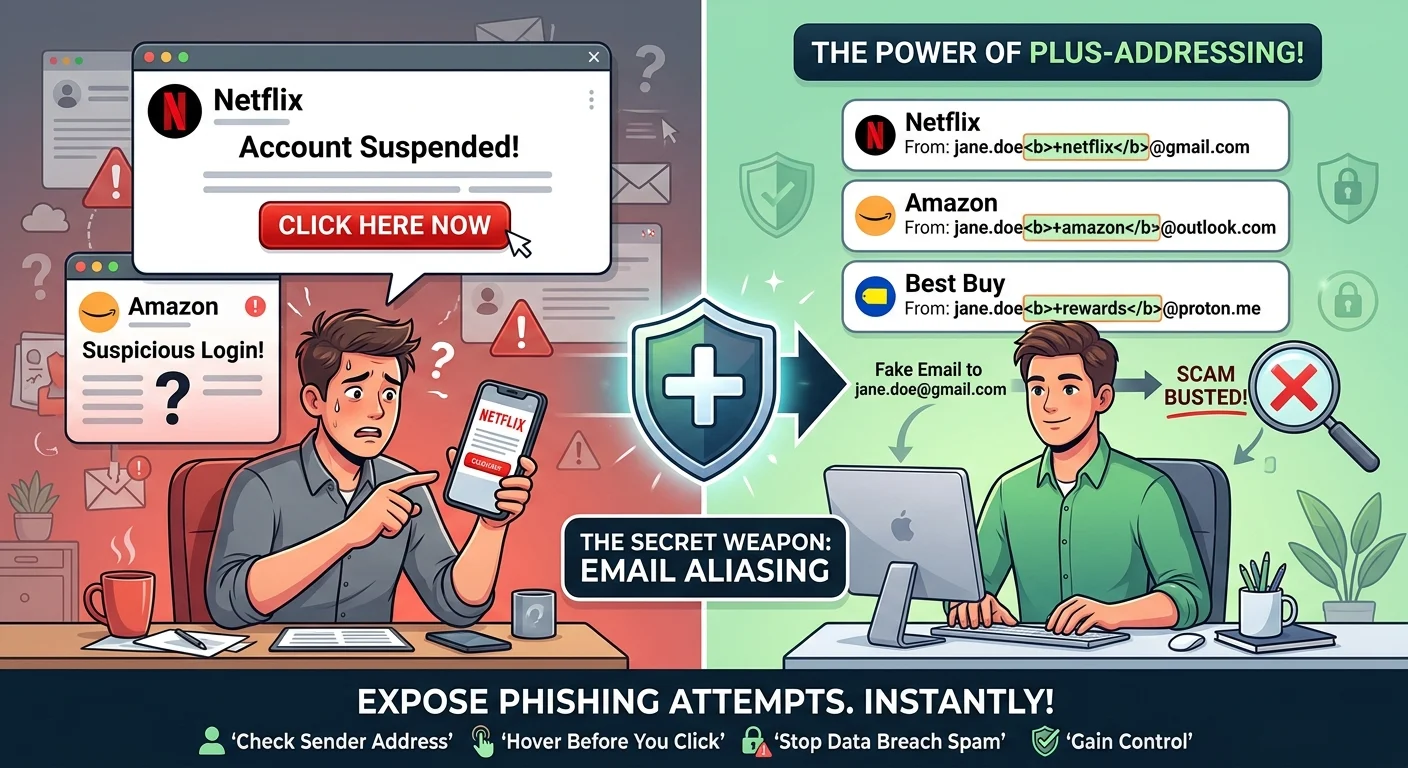
We have all been there. You get a frantic email from “Netflix” claiming your account is suspended, or a warning from “Amazon” about a suspicious login. Your heart rate spikes, your thumb hovers over the link, and for a split second, you are tempted to click. But what if a simple email trick could stop these dangerous phishing attacks cold before you even have to think about them?
The secret weapon is a built-in feature called plus-addressing, also known as sub-addressing or email aliasing. It is an incredibly powerful way to isolate your digital footprint. Here is the thing: almost every major email provider, including Gmail, Outlook, and Proton, supports this feature right out of the box.
So how does it work? It is beautifully simple.
When you sign up for a new online service, you do not use your standard email address. Instead, you insert a plus sign and a unique keyword right before the “@” symbol. For example, if your address is yourname@gmail.com, you would sign up for Netflix using yourname+netflix@gmail.com.
Your email provider completely ignores the plus sign and everything after it when delivering the message. The email still lands safely in your main inbox. But the magic happens in how you read it.
How This Simple Email Trick Exposes Phishing Attempts
Phishing attacks rely on deception and urgency to bypass your critical thinking. Scammers will spoof the display name of a trusted brand to make an email look genuine, which is a tactic known as display name spoofing. On mobile screens, your mail app often hides the actual sender address, making the scam highly convincing.
Now, this is where it matters.
If you signed up for Netflix using yourname+netflix@gmail.com, any legitimate communication from Netflix must be sent to that exact address. If a hacker tries to send you a fake Netflix email using a leaked database of standard email addresses, they will send it to yourname@gmail.com.
The moment you open that suspicious email and see it was sent to your general address instead of your custom Netflix alias, the scam is busted. You do not need to analyze headers, inspect suspicious links, or worry about the immediate steps to take if you clicked a phishing link. The wrong address is an instant giveaway.
How to Implement the Plus-Addressing Trick Today
Setting up this defense takes zero technical expertise and only takes a few seconds. You do not need to configure complex settings, install third-party plugins, or hire experts for small business cybersecurity protection. You can start using it immediately.
- For Gmail and Google Workspace: Simply add a plus sign and any word after your username, like username+target@gmail.com.
- For Outlook and Microsoft 365: This works exactly the same way, allowing addresses like username+chase@outlook.com.
- For Apple iCloud: You can use the built-in Hide My Email feature to generate completely random, unique aliases that forward to your main inbox.
- For Custom Domains: If you own your own domain, you can set up a catch-all email address or use dedicated forwarding services like SimpleLogin or Proton Pass to create clean, custom aliases.
So what does that mean for you? You gain complete control over your inbox. If a company suffers a data breach and your email is leaked, you will know exactly who was responsible the moment spam starts arriving at that specific alias. You can then simply set up a rule to delete any incoming mail to that compromised address.
Two More Quick Habits to Secure Your Inbox
While plus-addressing is an incredible shield, you should pair it with a couple of other simple habits to stay completely safe online. (For more advanced strategies, see our guide on [email security best practices]).
Always Check the Actual Sender Address
Never rely on the name shown at the top of an email. Scammers frequently change their display name to “PayPal Support” while sending from a random Gmail account. Always tap or click on the sender’s name to expand the details and inspect the actual domain behind it.
Hover Before You Click
If an email contains a button or a link, there is a simple trick to verify its safety. Hover your mouse cursor over the link without clicking it. Look at the bottom left corner of your browser or email client to see the real destination URL. If the email claims to be from your bank but the link points to a strange, unrelated website, do not click it.
Cybersecurity does not have to be complicated or overwhelming. By making plus-addressing your default habit when signing up for new accounts, you build a highly personalized firewall that hackers simply cannot crack.