(302) 262 8484
The Google Drive Mistake Destroying Small Business Backups

Why Cloud Sync Isn’t Actually a Backup
It’s the ultimate false sense of security. You probably think your company’s most valuable files are safe and sound just because they live in the cloud. But they aren’t. A single, super common Google Drive mistake might be quietly setting your small business up for a total data loss disaster.
A lot of business owners think that because they use Google Drive to store and sync their files, they have a reliable backup system in place. That is a dangerous misconception. Google Drive is a fantastic cloud storage and productivity tool. But it was never built to be a dedicated backup solution.
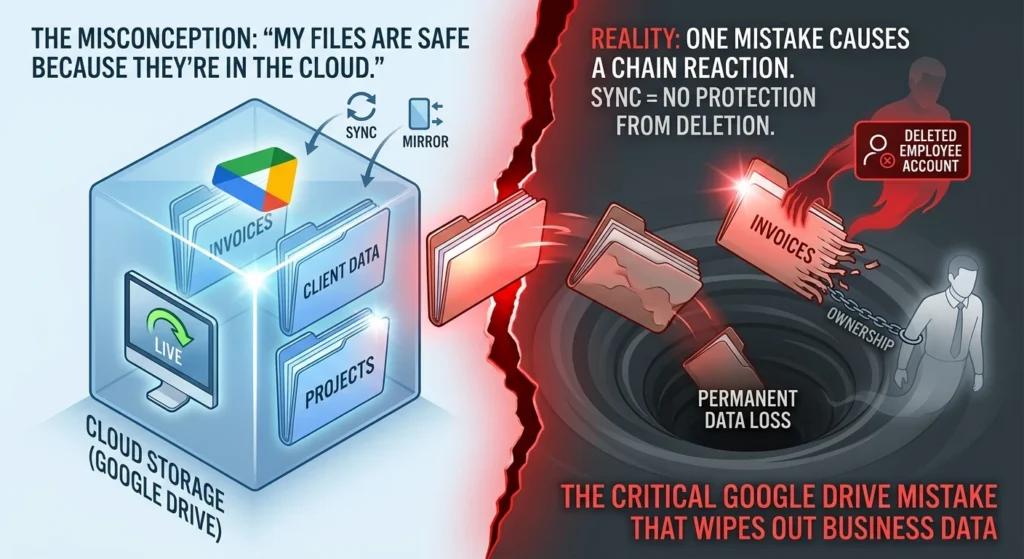
Here’s the thing. Cloud storage and cloud backup are two entirely different animals. When you run Google Drive for Desktop, it just creates a live mirror of your local files.
If you edit a document, it changes in the cloud. If you delete a folder, it vanishes from the cloud. And if a file gets hit with ransomware? That corrupted, locked version syncs to the cloud instantly. Basically, whatever happens to your local files happens to your cloud files, too.
The Google Drive Mistake That Ruins Small Business Backups
Relying just on Google Drive for your business backups leaves you wide open to a few massive vulnerabilities that require professional Small Business Cybersecurity Protection. We’re talking about risks that can wipe out years of hard work in seconds.
1. The Employee Offboarding Time Bomb
Picture this. Your bookkeeper manages all your company invoices using Google Sheets. After a great year, they decide to take a job at another company. So, you follow standard security practices and delete their Google Workspace account. A month later, you log in to check last year’s finances. Every single invoice is gone.
What does that mean for you? Well, in Google Drive, files are owned by the account that created them. They aren’t necessarily owned by the company itself. When you delete an employee’s account, all the files they owned get deleted right along with it. Even if those files were shared with the rest of your team. Google only gives you a tiny window to restore deleted account data. Usually, it’s about 25 days. Once that clock runs out, your business data is gone forever.
2. The Ransomware Syncing Nightmare
Google recently added ransomware detection to Drive for Desktop. It’s supposed to pause syncing when it notices suspicious activity. But it is far from a foolproof shield. If a hacker attacks your local systems and encrypts your hard drive, Google Drive might still sync those encrypted copies before the security systems even realize what’s happening.
If your only copy of a major project is a synced folder, you now just have two copies of completely useless, encrypted data, necessitating expert Ransomware Removal in Delaware. A real backup has to be completely isolated, which is why we often recommend our Proactive IT Monitoring for Small Business to detect threats before they escalate. It needs to be disconnected from your live network so ransomware literally can’t reach it.
3. Accidental Deletions and Limited Retention
Human error is the number one cause of data loss for small businesses. It happens all the time. It is ridiculously easy for an employee to trigger a data loss event, highlighting the need for comprehensive IT Consulting to secure your workflows.e to accidentally delete an important shared folder. If they empty their trash, or if nobody notices the missing files for a few weeks, getting that data back becomes almost impossible.
Google Drive just doesn’t offer the long-term archiving or point-in-time recovery options that businesses actually need to comply with industry regulations. Relying on a basic recycle bin is a massive risk. No business should take it.
How to Build a Real Small Business Backup Strategy
To keep your business running smoothly, you have to move past basic cloud syncing. You need a real, heavy-duty data protection plan.
A smart backup strategy follows the classic 3-2-1 backup rule. Here is what that looks like:
- Three copies of your data. That means one primary copy and two backups.
- Stored on two different types of media. For example, your local computer and an external hard drive.
- With one copy kept completely offsite in an isolated cloud location.
Now, this is where it really matters. To actually protect your Google Workspace data, you need to invest in a dedicated, third-party cloud backup service. Tools like Acronis, Backupify, or similar business-grade solutions do the heavy lifting for you. They automatically make daily, independent copies of your Google Drive, your Gmail, and your shared drives. These backups are stored completely outside of your main Google account. That means they are totally immune to accidental deletions, account closures, and ransomware syncs.
To make sure your business is fully covered, take a look at our guide on how to build a small business disaster recovery plan.
Finally, remember that a backup is only as good as your ability to actually restore it. Don’t just set it and forget it. Take the time to test your restore process at least twice a year. Pick a random file. Delete it. Try to recover it. Knowing for a fact that you can get your files back quickly is the only way to have true peace of mind.