(302) 262 8484
Why Ethernet Is Faster Even When Wi-Fi Says Full Signal

You look at your device, see a full five-bar Wi-Fi icon, and assume your connection is running at top speed. Then you start a download or launch an online game, and you immediately notice the lag. Plug in a physical cable, and that delay disappears. It might seem strange that Ethernet outperforms a perfect Wi-Fi signal, but the reason comes down to the physics of how wired and wireless connections manage data.
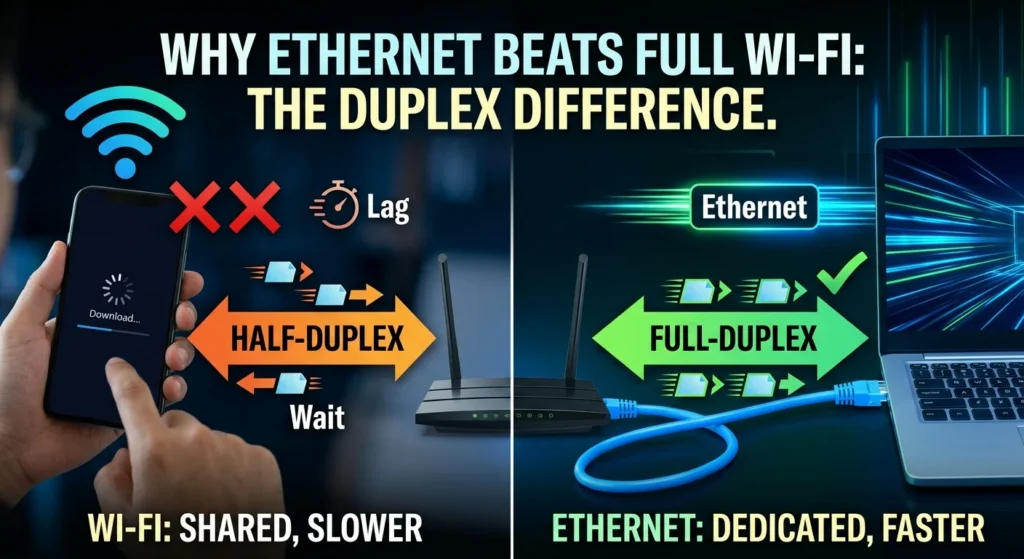
Ethernet is faster because it provides a dedicated, full-duplex wired connection with zero interference, while Wi-Fi is a shared, half-duplex medium that constantly deals with signal noise and packet loss. Even with full bars, a wireless device spends milliseconds waiting for its turn to transmit and resending corrupted data, which is why you should stop guessing where your Wi-Fi dies: how the NetSpot app maps your home’s dead zones.
Why Ethernet Is Faster Even With a Full Wi-Fi Signal: The Duplexing Difference
A major reason for this performance gap is a networking concept called duplexing. Most Wi-Fi operates as a half-duplex medium, while Ethernet is full-duplex, a distinction that is crucial when you are making sense of the different versions of Wi-Fi.
Think of half-duplex communication like a single-lane bridge. Traffic can cross in both directions, but only one way at a time. If a car is coming toward you, you have to wait. Your Wi-Fi router and your device operate the same way. They cannot transmit and receive data at the exact same millisecond, so they take turns rapidly switching back and forth.
Ethernet acts more like a multi-lane highway. The physical cable contains separate pairs of copper wires dedicated to sending and receiving, allowing it to do both simultaneously. This full-duplex capability means data flows constantly in both directions without any pauses, which makes the connection feel much more responsive.
The Shared Airwaves Problem
Connecting a device to your router with a Cat6 or Cat5e cable establishes a private path for your data. That physical wire belongs to your device alone, and no other hardware in your house can crowd onto that copper line.
Wi-Fi works differently. Even if you stand right next to the router with a perfect signal, you are sharing the airwaves. Every wireless device in the area—your phone, smart TV, smart plugs, and even your neighbor’s router across the street—competes for the same radio frequencies.
Wi-Fi uses a protocol that requires devices to listen to the airwaves to ensure no other device is transmitting. If the channel is busy, your device waits a random fraction of a second and tries again. This constant listening and waiting happens in milliseconds, but it adds up to a noticeable delay and slower real-world throughput.
The Hidden Cost of Packet Loss and Retransmissions
Wireless communication is highly susceptible to interference, even with a full signal. Radio waves have to travel through walls, bounce off furniture, and move around physical obstacles. Along the way, they encounter electromagnetic noise from standard household appliances.
When a radio wave gets distorted, the data packet it carries becomes corrupted. The router detects this corruption and immediately requests that the packet be sent again in a process known as a retransmission.
This happens entirely in the background, with your device constantly resending lost or damaged packets. This is a primary reason why Ethernet outperforms Wi-Fi despite a full signal indicator. An Ethernet cable is shielded against external electromagnetic interference, making packet loss virtually nonexistent. The data you send is received perfectly the first time.
Processing Latency and Signal Translation
Wireless networks also carry a processing cost. Before a router can send data over the air, it has to translate digital data into high-frequency radio waves. When your device receives those radio waves, its wireless card translates them back into digital data.
This translation process, along with the complex error-correcting codes required to keep wireless signals readable, takes processing power and time. Ethernet requires almost no translation. It relies on simple electrical pulses traveling down copper wires, which keeps latency incredibly low.
The Real-World Impact of Ethernet Over Full-Signal Wi-Fi
If you are just reading an article or checking email, you might not notice the difference between a wired and wireless connection. For real-time applications, however, the contrast is obvious.
- Online Gaming: High latency and sudden jitter can disrupt a match. Ethernet provides a stable, predictable ping.
- Video Conferencing: When a Zoom call freezes mid-sentence, the cause is usually Wi-Fi packet loss. Ethernet prevents these drops.
- Large Downloads: Because Ethernet avoids the overhead of wireless protocols, it consistently saturates your internet plan’s maximum bandwidth.
How to Test Your True Network Speed
To see the difference directly, you can run a simple baseline test that isolates your Wi-Fi performance from your actual internet speed.
- Disconnect any VPNs and stop heavy background downloads.
- Connect a laptop directly to your router using a known-good Cat5e or Cat6 Ethernet cable.
- Run a speed test and record your download speed, upload speed, and ping.
- Unplug the cable, connect to your Wi-Fi, and run the test again from the exact same location.
If your wired speed gets stuck at exactly 100 Mbps, you might be dealing with an old or damaged cable, or a legacy port on your router. If you need help selecting the right hardware, see our guide on [choosing the best ethernet cable]. Upgrading to a modern Cat6 cable will allow you to reach full gigabit speeds.
Wireless networking offers excellent convenience, but a wired connection remains technically superior. For the most demanding devices on your network, a physical connection is still the most reliable option.